Many developers assume that changing a proxy IP is enough to avoid detection. In 2026, that assumption is no longer accurate. Modern websites do not rely only on IP addresses when evaluating traffic. They combine multiple signals, including TLS fingerprints, browser fingerprints, HTTP headers, cookies, IP reputation, session behavior, and interaction patterns.
This matters because even a high-quality residential proxy cannot fix an unusual TLS fingerprint. If an automated client uses a TLS stack that looks different from a real browser, systems such as Cloudflare, Akamai, Imperva, Kasada, PerimeterX, and DataDome may still classify the request as suspicious.
TLS fingerprinting has become an important part of modern anti-bot detection because it works before the website even sees JavaScript behavior or browser APIs. The server can analyze how the client starts a secure connection and compare that pattern against known browsers, scripts, libraries, and automation tools.
This guide explains what TLS fingerprinting is, how JA3 and JA4 work, why they matter for web scraping and browser automation, and how developers can reduce detection risk by combining modern browsers with high-quality proxy infrastructure.
What Is TLS Fingerprinting?
TLS, or Transport Layer Security, is the protocol that secures HTTPS connections. Before a browser can load a secure website, it performs a TLS handshake with the server. During this handshake, the client sends a message called Client Hello.
The Client Hello includes technical details about the client’s supported TLS capabilities, such as TLS version, cipher suites, extensions, supported groups, signature algorithms, and ALPN protocols.
Different clients send different TLS handshake patterns. Chrome, Firefox, Safari, Edge, Python Requests, curl, Go, Node.js, OpenSSL, and Java HTTP clients may all produce different TLS signatures.
A simplified flow looks like this:
Browser or HTTP Client
        ↓
TLS Client Hello
        ↓
Server
        ↓
Generate TLS Fingerprint
        ↓
Compare Against Known Patterns
A real Chrome browser on Windows will usually have a different TLS fingerprint from a Python script using Requests. A Go HTTP client may look different from Safari. A headless browser with an outdated TLS stack may look different from a current stable browser.
This is the core idea behind handshake fingerprinting: the server does not need to inspect the full user interface or wait for JavaScript execution. It can evaluate the connection pattern at the network layer.
What Is JA3?
JA3 is a TLS fingerprinting method originally introduced by Salesforce researchers in 2017. It creates a fingerprint from specific fields inside the TLS Client Hello.
JA3 typically uses the following values:
TLS version
Cipher suites
Extensions
Elliptic curves
EC point formats
These values are normalized and joined into a string. The string is then hashed, usually with MD5, to produce a compact fingerprint.
A simplified JA3 string may look like this:
771,4865-4866-4867,0-11-10-35,29-23-24,0That string becomes a hash:
d4e5f6xxxx...The advantage of JA3 is that servers and security tools can compare hashes instead of parsing every TLS field manually. If a request has a JA3 fingerprint commonly associated with automation tools, malware, scraping clients, or unusual libraries, it may be treated as higher risk.
JA3 became popular because it made TLS fingerprinting practical and easy to operationalize. Security teams could log JA3 hashes, compare them across traffic, and identify suspicious patterns.
However, JA3 also has limitations. It can be spoofed, and it does not always handle modern protocol complexity as well as newer fingerprinting methods.
What Is JA4?
JA4 is a newer fingerprinting approach designed to address some of JA3’s weaknesses. It was developed to be more stable, more structured, and more useful across modern internet protocols.
JA3 was powerful, but it became easier for clients to mimic common fingerprints. In addition, modern traffic increasingly involves HTTP/2, HTTP/3, QUIC, and more complex client behaviors. JA4 was designed with these realities in mind.
JA4 focuses on producing more consistent fingerprints and supports broader protocol analysis. It can be more useful for modern browser detection, bot analysis, and security monitoring.
| Comparison Area | JA3 | JA4 |
|---|---|---|
| Original Purpose | TLS Client Hello fingerprinting | Modern traffic fingerprinting |
| Introduced | 2017 | Newer generation |
| Fingerprint Style | Hash-based TLS fingerprint | More structured fingerprinting |
| HTTP/2 Support | Limited | Better suited for modern protocols |
| HTTP/3 / QUIC Support | Limited | Better suited for newer traffic patterns |
| Spoofing Resistance | Easier to mimic | More stable and harder to manipulate |
| Use Case | TLS anomaly detection | Broader bot and traffic analysis |
JA4 does not make JA3 irrelevant. Many tools still use JA3, and many security teams still analyze JA3 hashes. But JA4 reflects the direction of modern traffic fingerprinting: more context, more stability, and better support for current browser and protocol behavior.
Why TLS Fingerprinting Matters
TLS fingerprinting matters because modern anti-bot systems rarely depend on one signal. A website may not block traffic only because of an IP address. Instead, it may calculate a risk score based on many layers.
A simplified risk model may look like this:
IP Reputation
TLS Fingerprint
HTTP Headers
Browser Fingerprint
Cookies
Behavior
        ↓
Risk Score
        ↓
Allow / Challenge / Block
For example, a request may come through a residential proxy, but if the TLS fingerprint looks like an outdated script library and the headers do not match a real browser, the session may still appear suspicious.
Similarly, if a browser fingerprint says “Chrome on Windows,” but the TLS fingerprint looks like a non-browser HTTP client, the mismatch can increase risk.
Systems from Cloudflare, Akamai, Imperva, Kasada, PerimeterX, DataDome, and other security vendors may evaluate these layers together. They look for consistency across network, protocol, browser, and behavior signals.
This is why proxy users need to understand TLS-level detection. A proxy changes the network identity, but it does not automatically make the client behave like a real browser.
JA3 vs Browser Fingerprinting
JA3 and browser fingerprinting are often confused, but they operate at different layers.
JA3 is a network-layer fingerprint based on TLS handshake behavior. Browser fingerprinting happens at the browser and JavaScript layer.
Browser fingerprinting may evaluate signals such as Canvas, WebGL, fonts, audio, timezone, screen size, device memory, hardware concurrency, language, plugins, and browser APIs.
| Category | JA3 / JA4 TLS Fingerprinting | Browser Fingerprinting |
|---|---|---|
| Layer | Network / TLS layer | Browser / JavaScript layer |
| Main Source | TLS Client Hello | Browser APIs and runtime behavior |
| Examples | TLS version, cipher suites, extensions | Canvas, WebGL, fonts, timezone, screen |
| Happens Before Page Load | Yes | Usually after page scripts run |
| Affected by Proxy | No | No |
| Affected by Browser Choice | Yes | Yes |
| Common Use | Detect non-browser clients and automation | Detect unusual browser environments |
A request can fail consistency checks if these layers do not match. For example, a browser may claim to be Chrome through the User-Agent header, but the TLS handshake may not look like Chrome. That mismatch can be more suspicious than either signal alone.
Can Residential Proxies Hide JA3?
No. Residential proxies do not hide or change JA3 by themselves.
A proxy changes the network path. It can affect IP address, ASN, location, and IP reputation. It does not automatically change the TLS Client Hello generated by your browser, HTTP client, or automation framework.
A residential proxy can help with:
IP address
ASN
Geographic location
Network reputation
Regional access
But it does not directly change:
TLS Client Hello
JA3 fingerprint
JA4 fingerprint
Browser fingerprint
HTTP header consistency
JavaScript execution behavior
This is why successful automation often requires both a good proxy strategy and a realistic client environment. A high-quality residential proxy should be paired with a modern browser or a browser automation framework that produces realistic TLS behavior.
In other words, residential proxies are important, but they are not a complete fingerprinting solution on their own.
How to Reduce TLS Fingerprint Detection
The goal should not be to “bypass” detection systems. A better goal is to build a consistent, realistic, and responsible automation environment.
Here are practical ways to reduce TLS fingerprint mismatch and improve reliability.
Use real modern browsers whenever possible. Chrome, Firefox, Safari, and Edge usually produce more realistic TLS behavior than lightweight HTTP clients.
Avoid outdated headless browsers. Older headless environments may produce fingerprints that differ from current browser versions.
Keep Playwright, Puppeteer, and browser binaries updated. Modern automation frameworks frequently update browser builds and protocol behavior.
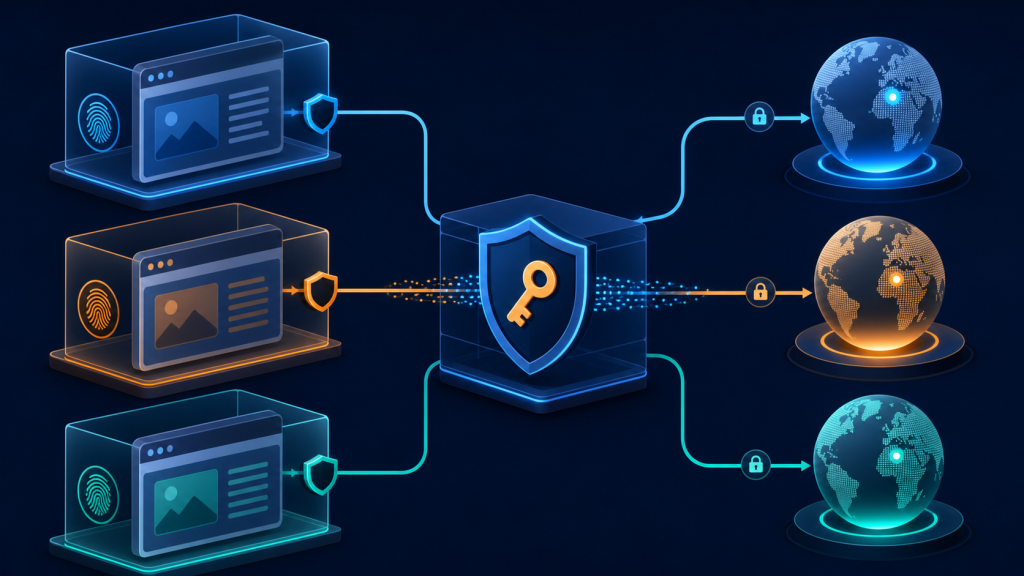
Use a modern TLS stack. Old OpenSSL versions or unusual client libraries may create fingerprints that are easy to classify.
Keep headers consistent with the browser. If the TLS fingerprint looks like Chrome, but the headers look like a custom script, the mismatch can increase risk.
Maintain session consistency. Do not rotate IPs too aggressively during login, checkout, dashboard, or multi-step browser workflows.
Use residential or ISP proxies for workflows that require realistic network identity. They help improve IP reputation and location consistency.
Avoid unnecessary low-level TLS modifications. Custom TLS libraries or manual fingerprint manipulation can create new inconsistencies.
A simple checklist:
Use a current Chrome or Firefox build
Keep Playwright or Puppeteer updated
Match headers with browser behavior
Use residential or ISP proxies where appropriate
Use sticky sessions for session-based workflows
Avoid rotating IPs mid-session
Monitor errors, challenges, and response quality
Respect website terms and access rules
TLS Fingerprinting and Web Scraping
TLS fingerprinting is especially important for web scraping because many scraping scripts use HTTP clients that do not behave like real browsers.
Python Requests, Go HTTP clients, curl, Java HTTP libraries, and raw OpenSSL-based clients can produce TLS fingerprints that are easy to distinguish from Chrome or Safari. These tools are efficient and useful, but they may not be appropriate for websites with advanced bot protection.
Browser automation tools such as Playwright and Puppeteer usually perform better on complex websites because they run real browser engines. They can execute JavaScript, handle cookies, load dynamic content, and generate more realistic browser-level behavior.
However, even browser automation must be configured carefully. A real browser with unstable proxy rotation, mismatched headers, inconsistent time zones, or unusual session behavior can still trigger risk systems.
For simple public pages, lightweight HTTP clients may be enough. For dynamic websites, login workflows, ecommerce monitoring, or bot-protected pages, a modern browser environment combined with a stable proxy strategy is usually more reliable.
How ColaProxy Helps
ColaProxy provides proxy infrastructure for data collection, browser automation, SEO monitoring, ecommerce intelligence, and enterprise web workflows.
ColaProxy supports residential proxies, ISP proxies, mobile proxies, rotating sessions, sticky sessions, HTTP(S), SOCKS5, and broad geographic coverage across 195+ countries and regions.
It is important to be clear: proxies do not modify TLS fingerprints by themselves. ColaProxy does not “bypass” JA3 or JA4 detection. TLS fingerprints are generated by the client, browser, or automation framework.
What ColaProxy can help with is the network identity layer. High-quality residential and ISP proxies can provide more realistic IP reputation, better regional consistency, and more stable access patterns when paired with modern browsers such as Chrome, Playwright, Puppeteer, or Selenium.
For example, if a team is using Playwright for ecommerce monitoring, ColaProxy can provide country-specific residential proxies and sticky sessions so that the browser environment, IP location, session behavior, and target market remain more consistent.
For large-scale public data collection, rotating residential proxies can help distribute traffic across a broader network. For account-based or multi-step workflows, sticky ISP or residential sessions may provide better continuity.
The strongest setup is not proxy-only. It is the combination of modern browser automation, realistic network identity, consistent headers, stable sessions, and responsible access behavior.
FAQ
Does a proxy change JA3?
No. A proxy changes the network route, IP address, ASN, and location, but it does not directly change the TLS Client Hello generated by your browser or HTTP client. JA3 is controlled by the client’s TLS behavior.
Can websites detect TLS fingerprints?
Yes. Websites and security systems can analyze TLS handshake patterns and compare them with known browsers, automation tools, libraries, and suspicious clients.
Is JA4 replacing JA3?
JA4 is a newer and more structured approach that improves on some JA3 limitations, especially for modern protocols. However, JA3 is still widely used and remains important in traffic analysis.
Does Chrome always have the same JA3?
Not always. Chrome’s TLS fingerprint may vary by version, operating system, build, flags, protocol support, and network conditions. However, real Chrome builds generally produce recognizable browser-like fingerprints.
Can Playwright change JA3?
Playwright itself does not simply “set” JA3 like a header. JA3 is generated by the underlying browser and TLS stack. Keeping Playwright and its browser binaries updated usually helps maintain realistic TLS behavior.
Can residential proxies prevent fingerprint detection?
Residential proxies can improve network identity, IP reputation, and location consistency, but they do not prevent TLS or browser fingerprint detection by themselves. They should be combined with modern browsers and consistent session behavior.
Should I use HTTP or SOCKS5 proxies?
Both can work depending on the tool and workflow. HTTP(S) proxies are common for web scraping and browser automation. SOCKS5 proxies can be useful for broader protocol support. The best choice depends on your client, framework, and target use case.
Which browsers generate the most realistic TLS fingerprints?
Current stable versions of major browsers such as Chrome, Firefox, Safari, and Edge generally produce the most realistic fingerprints. Outdated headless browsers, custom HTTP clients, and unusual TLS libraries are more likely to stand out.
Conclusion
TLS fingerprinting is now a major part of modern anti-bot detection. Websites no longer evaluate only IP addresses. They combine IP reputation, TLS fingerprints, browser fingerprints, HTTP headers, cookies, sessions, and behavioral signals to decide whether traffic looks trustworthy.
JA3 and JA4 help security systems identify patterns in TLS behavior. A request may use a residential proxy and still look suspicious if its TLS fingerprint does not match its claimed browser environment.
For developers working on web scraping, browser automation, SEO monitoring, ecommerce intelligence, or data collection, the best approach is consistency. Use modern browsers, keep automation frameworks updated, align headers and sessions, avoid unstable rotation during multi-step workflows, and pair realistic clients with high-quality residential or ISP proxies.
As anti-bot systems increasingly combine network, protocol, browser, and behavior signals, using only a proxy is no longer enough. Pairing modern browsers with reliable proxy infrastructure creates a more consistent automation environment. ColaProxy offers global residential, ISP, and mobile proxies that integrate easily with Playwright, Puppeteer, Selenium, and other automation frameworks, making them a strong foundation for large-scale data collection and browser automation.