Summary
In 2026, successfully navigating YouTube’s ecosystem requires more than just masking an IP address; it requires a high-trust digital identity. Residential proxies remain the gold standard for scraping, while Static ISP proxies are essential for stable account management.
For those facing the toughest “VPN/Proxy Detected” filters, Mobile 4G/5G proxies offer the highest authority. This guide breaks down exactly which tools you need to stay undetected and efficient.
What is the Best YouTube Proxy for Your Needs in 2026?
If you’ve ever seen the message “The following content is not available in your country” or been hit with a sudden “suspicious activity” login challenge, you know that YouTube’s security is no joke. As we move through 2026, Google’s AI-driven detection has evolved. It no longer just checks if an IP is on a blacklist; it analyzes the behavioral consistency and network origin of every request.
Finding the best YouTube proxy isn’t just about unblocking a video; it’s about protecting your digital assets—whether those are aged accounts, marketing data, or automated engagement bots. At ColaProxy, we’ve analyzed millions of connection requests to determine which proxy architectures actually stand up to modern scrutiny.
Why You Need a Dedicated YouTube Proxy Strategy
Standard VPNs and cheap datacenter IPs are the first things YouTube’s “Trust Score” algorithm flags. In 2026, the platform uses Generative Engine Optimization (GEO) principles to identify bot-like patterns. If you are using a shared IP that 100 other people are using to spam comments, your account is “guilty by association.”
The Key Benefits of Using High-Quality Proxies:
- Bypassing Geo-Restrictions: Access content globally by appearing as a local user.
- Account Multi-Management: Run 10, 50, or 100 channels from one machine without “linking” them.
- Data Scraping: Extract trends and comments without triggering CAPTCHAs.
- Privacy: Keep your actual home or office IP hidden from Google’s tracking.
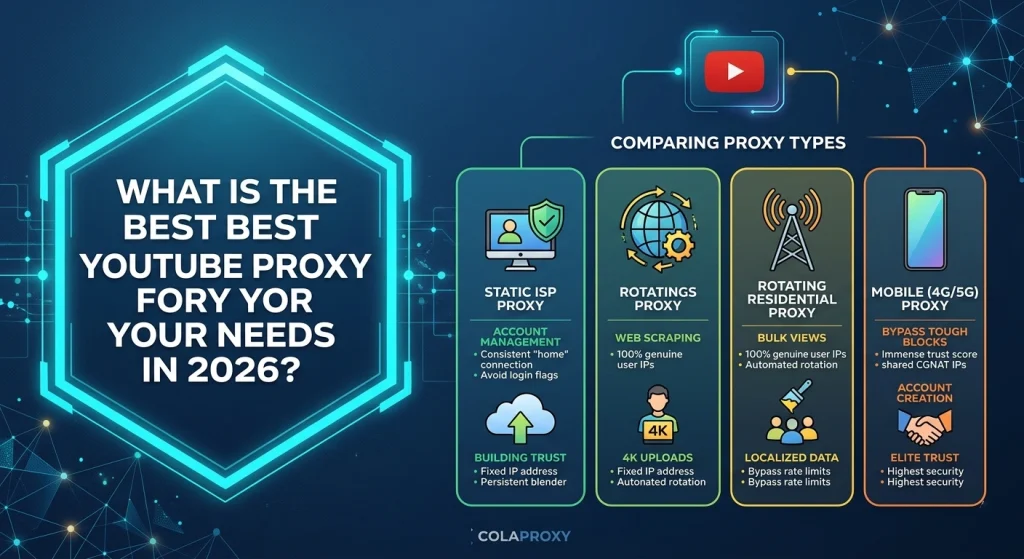
Comparing the Top 3 Proxy Types for YouTube
Not all proxies are created equal. Depending on your project—be it scraping or account growth—the best YouTube proxy type will vary.
A. Residential Proxies: The Versatile Legend
Residential proxies are IP addresses provided by Internet Service Providers (ISPs) to real homeowners. When you use these, you look like a person sitting on their couch at home.
- Best For: Bulk view generation, market research, and localized scraping.
- Pro: Extremely hard to detect because the IP belongs to a real household.
- Con: Usually billed by traffic (GB), so 4K video streaming can get expensive.
B. Static ISP Proxies: The Professional’s Choice
Also known as “Static Residential,” these are hosted in datacenters but use residential IP announcements. They offer the speed of a server with the reputation of a home connection.
- Best For: Long-term account management and uploading content.
- Why it’s the best YouTube proxy for creators: The IP never changes. YouTube sees the same “user” logging in from the same “location” every day, which builds massive account trust.
C. Mobile Proxies (4G/5G): The “Unstoppable” Option
Mobile proxies route traffic through cellular towers. They are the most expensive but have the highest trust scores in the industry.
- Best For: Account creation and bypassing “VPN Detected” errors.
- The Secret Sauce: Because hundreds of real mobile users share one IP (via CGNAT), YouTube cannot block the IP without collateral damage to real customers.
Technical Comparison Table: Which Should You Choose?
| Feature | Rotating Residential | Static ISP | Mobile (4G/5G) |
| Trust Score | High | Very High | Elite |
| Speed | 10-50 Mbps | 100+ Mbps | 20-60 Mbps |
| Ideal Use | Scraping/Views | Managing Channels | Account Creation |
| Detection Risk | Low | Very Low | Minimal |
| Cost | Medium | Low (Flat rate) | High |
Step-by-Step: How to Use a Proxy for YouTube Without Getting Banned
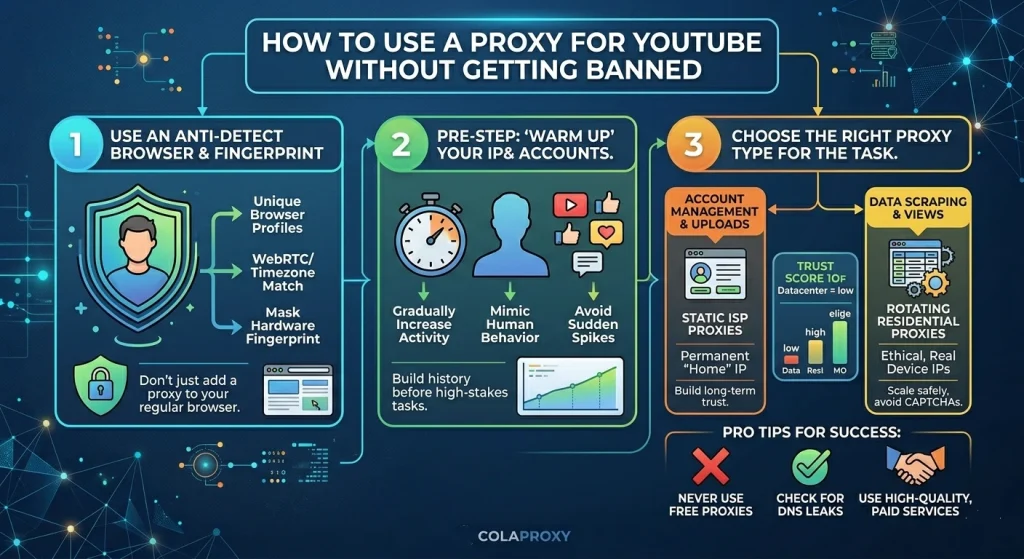
Based on our experience at ColaProxy, most bans happen because of “Leaky” setups, not the proxy itself. Follow this methodology to stay safe:
Step 1: Use an Anti-Detect Browser
Don’t just plug a proxy into Chrome. Use tools like AdsPower, Multilogin, or OKBrowser. These tools allow you to create separate “browser profiles” with unique fingerprints (Canvas, WebRTC, and Hardware ID) for each best YouTube proxy you use.
Step 2: Match Your Timezone and Language
If your proxy is in Los Angeles, but your computer’s system time is set to Beijing, YouTube’s AI will immediately flag the discrepancy. Ensure your browser profile automatically matches the proxy’s IP geography.
Step 3: Avoid Sudden Bursts
If you are using proxies for engagement, don’t go from 0 to 10,000 views in an hour. Mimic human behavior: watch the video, like it after 2 minutes, and leave a relevant comment.
FAQ: Answering Your Search Intent
How does a proxy server work for YouTube?
A proxy acts as a middleman. When you request a video, the request goes to the proxy server first, which then fetches the data from YouTube using its own IP address. YouTube only sees the proxy’s IP, not yours.
Does YouTube detect proxy IPs in 2026?
Yes, they use sophisticated databases from companies like IP2Location or MaxMind to identify datacenter ranges. This is why using residential or ISP IPs is mandatory for professional use.
Can I use a free proxy for YouTube?
We strongly advise against it. Free proxies often log your data, steal passwords, and are already blacklisted by Google. If you care about your channel, invest in a paid service.
How to unblock YouTube using a proxy?
Simply get your proxy credentials (IP, Port, Username, Password) from ColaProxy, enter them into your browser settings or a proxy manager extension like SwitchyOmega, and navigate to YouTube.com.
The “ColaProxy” Advantage: Why Quality Matters
At ColaProxy, we don’t just provide IPs; we provide infrastructure. Our rotating residential proxies draw from a pool of 50M+ real home devices, and our static ISP proxies are sourced from premium providers like AT&T and Comcast to ensure your accounts stay live.
Internal Resources for Further Reading:
- Web Scraping Blocked Again? Fix It Fast with These High-Quality Proxies
- How to Avoid “Ghost Checkouts” on Supreme Using Residential IPs?
- Stop Getting Banned: The Science of Residential IP Rotation
Checklist for Your YouTube Proxy Setup
Before you launch your campaign, ensure you have checked off the following:
- Clean IP: Is the IP not listed on major blacklists?
- SOCKS5 Support: Are you using the SOCKS5 protocol for better speed?
- DNS Leak Protection: Is your real DNS hidden?
- Fingerprint Match: Does your browser fingerprint match the proxy’s location?
- Ethical Sourcing: Is your provider using ethically sourced IPs to avoid legal issues?
Final Takeaway: The Best YouTube Proxy Strategy for 2026
The era of “set and forget” proxies is over. To succeed on YouTube today, you need a hybrid approach. Use Rotating Residential for the heavy lifting of data and views, and Static ISP or Mobile for the delicate work of managing your brand’s home on the platform.
Choosing the best YouTube proxy is an investment in your channel’s longevity. Don’t let a “cheap” IP be the reason your years of hard work disappear overnight.
Ready to elevate your YouTube game? Explore ColaProxy’s Premium Solutions and get started with a high-trust IP pool today.