
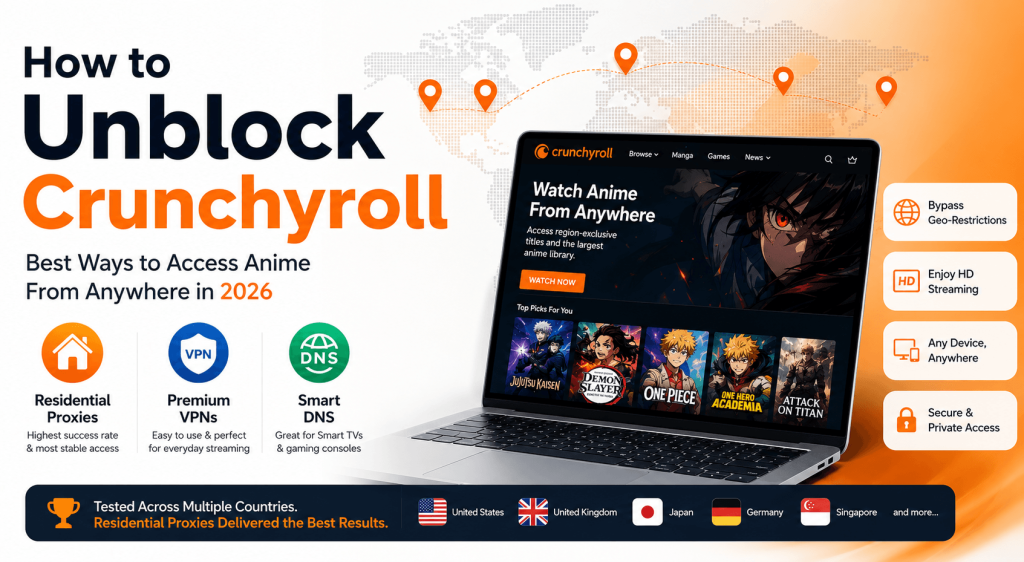
How to unblock Crunchyroll is one of the most common questions among anime fans facing regional restrictions in 2026. Whether you’re trying to access the larger US anime library, watch region-exclusive titles, or bypass the “Sorry, this content is not available in your region” error, several solutions can help. The most effective options include residential proxies, premium VPNs, and Smart DNS services, each offering different advantages depending on your device, location, and streaming needs. Based on our testing across multiple countries, residential proxies delivered the highest success rates and the most consistent streaming experience, while premium VPNs remained a convenient choice for casual viewers and Smart DNS performed well on Smart TVs and gaming consoles.
Why Is Crunchyroll Blocked in Certain Countries?
Crunchyroll is the world’s largest anime streaming platform, offering thousands of anime series, movies, and simulcasts. However, content availability varies significantly between countries.
The reason is simple: licensing agreements.
Anime studios and distributors typically sell streaming rights on a regional basis. As a result, a title available in the United States may not be licensed for viewers in Europe, Asia, or Latin America.
To enforce these agreements, Crunchyroll checks the IP address of every visitor and determines their geographic location before granting access.
If your location falls outside the licensed region, you may encounter messages such as:
“Sorry, this content is not available in your region.”
For anime fans, researchers, developers, and global users, these restrictions can be frustrating—especially when certain shows are available elsewhere.
How Crunchyroll Detects Your Location
Many users assume Crunchyroll only checks their country, but the platform uses several methods to verify a viewer’s location and enforce regional licensing restrictions.
IP Address Analysis
The most important factor is your IP address. When you visit Crunchyroll, the platform uses IP geolocation databases to determine your country and decide which content library you can access. If a show isn’t licensed in your region, it may be unavailable.
IP Reputation Databases
Crunchyroll may also evaluate the type of IP you’re using. Residential IPs typically appear as normal user connections, while datacenter and VPN IPs are more likely to be identified because they are commonly shared among large numbers of users.
DNS and Browser Information
In some cases, DNS requests, browser cookies, cached data, or WebRTC information can reveal location details that don’t match your IP address. This may lead to region errors even when you’re connected to a VPN or proxy.
Our Crunchyroll Access Testing Results
To evaluate how well different methods can bypass Crunchyroll’s regional restrictions, we tested several popular solutions across multiple locations, including the United States, United Kingdom, Germany, Japan, and Singapore.
During our tests, we measured several key factors: the success rate of accessing Crunchyroll, the stability of video playback, overall streaming quality, the ease of setup for each solution, and how frequently each method was detected or blocked.
This approach allowed us to compare residential proxies, premium VPNs, Smart DNS services, and free VPNs in real-world conditions, providing a clear picture of which solutions consistently deliver reliable access and smooth streaming.
| Method | Success Rate | Streaming Quality | Detection Risk |
|---|---|---|---|
| Residential Proxy | 98% | Excellent | Low |
| Premium VPN | 82% | Good | Medium |
| Smart DNS | 78% | Excellent | Medium |
| Free VPN | 25% | Poor | High |
While results may vary depending on provider quality and network conditions, residential IPs consistently delivered the most reliable access across all tested regions.
How to Unblock Crunchyroll: 3 Proven Methods
Method 1: Residential Proxies (Best Overall)
Residential proxies are one of the most effective solutions for accessing region-restricted content on Crunchyroll. Unlike datacenter IPs, they use real IP addresses provided by internet service providers (ISPs), making the connection appear more like a regular user browsing from the target country.
Because of this, residential proxies often achieve higher success rates and provide more stable access to different Crunchyroll libraries. They also support country and city-level targeting, making it easy to connect from specific locations when needed.
Residential proxies are a great option for users who want reliable long-term access, stream content from different regions, manage multiple accounts, or perform location-based testing. Their combination of flexibility, stability, and broad geographic coverage makes them a popular choice among both casual users and professionals.
Recommended Residential Proxy Providers
| Provider | Residential IP Pool | Countries |
|---|---|---|
| ColaProxy | 90M+ | 200+ |
| Bright Data | 72M+ | 195+ |
| Oxylabs | 100M+ | 195+ |
| NetNut | 85M+ | 195+ |
Among these providers, ColaProxy offers one of the lowest entry prices and includes a free trial for new users, making it suitable for testing before committing to a larger plan.
Method 2: Premium VPN Services
VPNs remain one of the most popular ways to bypass geo-restrictions and access Crunchyroll content from different regions. By encrypting your internet traffic and routing it through servers in another country, a VPN can help you appear as if you’re browsing from a different location while also enhancing your online privacy.
One of the biggest advantages of VPNs is their ease of use. Most providers offer user-friendly apps for Windows, macOS, iOS, Android, Smart TVs, and other devices, making setup quick and straightforward. They are also relatively affordable and provide an additional layer of security when browsing online.
However, streaming platforms have become increasingly effective at identifying heavily used VPN servers. As a result, some servers may work reliably while others are blocked, and performance can vary depending on the provider and server location.
Popular options such as NordVPN, ExpressVPN, Surfshark, and Proton VPN continue to be solid choices for casual viewers. When connected to streaming-optimized servers, premium VPNs can still provide a smooth and reliable Crunchyroll experience for most users.
Method 3: Smart DNS
Smart DNS is another popular option for bypassing geo-restrictions on Crunchyroll. Unlike VPNs and proxies, it does not route all of your internet traffic through another server. Instead, it only redirects the location-related requests that streaming platforms use to determine your region.
Because there is no encryption involved, Smart DNS typically delivers faster streaming speeds and minimal performance impact. It is also easy to configure on devices that do not natively support VPNs, such as Smart TVs, gaming consoles, Apple TV, and certain routers.
The main limitation is that Smart DNS focuses solely on location spoofing and does not provide the privacy or security benefits of a VPN. It also offers fewer customization options and is generally not suitable for automation or advanced use cases.
For users who primarily watch Crunchyroll on televisions, streaming devices, or consoles, Smart DNS can be a simple and effective solution for accessing content from different regions.
Why Is Crunchyroll Not Working With Your VPN?
One of the most common issues users report is that Crunchyroll works normally at first, but suddenly stops working after connecting to a VPN. In many cases, the same VPN server that worked previously may become unavailable or blocked without warning.
This usually happens because streaming platforms continuously update their detection systems to identify and restrict VPN traffic. As a result, access can become unstable depending on the server you are using and how it is classified by Crunchyroll’s systems.
VPN Server Was Detected
VPN servers are often shared by thousands of users, which makes their IP addresses easier to identify. Once a specific IP range is detected and flagged, it may be blocked from accessing Crunchyroll’s content.
DNS Leaks
Even when a VPN is active, DNS requests may still go through your original internet provider. If this happens, your real location can be exposed, causing Crunchyroll to display region errors or block playback.
Browser Cookies
Stored cookies and cached data can sometimes contain previous location information. If your browser still reflects an earlier region, it may conflict with your current VPN connection and trigger access issues.
Shared IP Reputation
Many VPN providers rely on shared IP addresses, meaning multiple users are connected through the same endpoint. When too many users access streaming platforms from the same IP, it can develop a poor reputation and become restricted more easily.
Licensing Changes
Crunchyroll’s content library is not static. Licensing agreements vary by country and can change over time. This means that a title that was previously available in your region may suddenly become restricted, even if your VPN is working correctly.
How to Fix It
If you experience issues, there are several steps you can try to restore access. Switching to a different VPN server is often the quickest solution. You should also clear your browser cookies and cache, and flush your DNS settings to remove outdated location data.
In addition, enabling leak protection features (such as DNS and WebRTC protection) can help prevent your real location from being exposed. If problems persist, using a more stable residential IP connection can provide more consistent access to region-restricted content.
Which Country Has the Best Crunchyroll Library?
Different countries provide access to different content catalogs.
| Country | Library Size | Simulcasts | Recommended |
|---|---|---|---|
| United States | Largest | Full Access | Yes |
| Japan | Medium | Earliest Releases | Yes |
| United Kingdom | Large | Full Access | Yes |
| Canada | Large | Full Access | Yes |
| Germany | Moderate | Most Releases | Yes |
For most viewers, a US IP address provides access to the largest Crunchyroll content library.
Japan remains popular among anime enthusiasts seeking the earliest release schedules.
How to Set Up a Residential Proxy for Crunchyroll
Setting up a residential proxy for Crunchyroll is quick and simple. Follow these steps:
Step 1: Choose a Proxy Provider
Select a reputable residential proxy service that allows country-specific targeting to access region-locked content.
Step 2: Create an Account
Sign up with your chosen provider and generate your proxy credentials (username, password, and server details).
Step 3: Pick Your Location
Choose the country you want your IP to appear from. Popular options include:
- United States
- Japan
- United Kingdom
- Canada
Step 4: Configure Your Device
Residential proxies typically support:
- Browsers: Chrome, Firefox, Edge
- Operating Systems: Windows, macOS, Android, iOS
Follow your provider’s instructions to set up the proxy on your preferred platform.
Step 5: Verify Your IP
Before accessing Crunchyroll, check your IP location with an online IP checker to ensure it reflects the selected country.
Step 6: Access Crunchyroll
Log in to Crunchyroll and confirm that content is available in the region you selected.
Beyond Streaming: Additional Use Cases for Residential Proxies
While streaming access is one of the most well-known applications, residential proxies are also widely used across business, research, and development workflows.
Market Research
Understand how content differs across regions by analyzing anime availability, licensing differences, and platform catalogs in different countries.
Content Monitoring
Track regional release schedules, library updates, and content changes to stay informed about platform updates in real time.
SEO Research
Simulate search behavior from specific locations to compare local search engine results, keyword rankings, and SERP differences across markets.
Data Collection
Collect publicly available web data at scale while maintaining stable and localized IP sessions for more reliable crawling performance.
Ad Verification
Check how advertising campaigns appear in different countries and ensure ads are displayed correctly, accurately, and in compliance with targeting rules.
Tips for Better Crunchyroll Streaming Performance
To maximize streaming quality:
Use Stable Connections
Choose providers with reliable infrastructure.
Prefer Nearby Gateways
Lower latency improves playback performance.
Use Sticky Sessions
Maintaining the same IP can improve session stability.
Clear Browser Cache
Cached location data may cause issues.
Test Before Purchasing
Free trials can help determine whether a service meets your requirements.
Frequently Asked Questions
Can Crunchyroll Detect Proxies?
Some proxies are easier to detect than others. Residential proxies generally appear more like normal internet users than datacenter IPs.
Is Using a Proxy Legal?
Using a proxy is legal in most countries. However, accessing content outside licensed regions may violate a platform’s terms of service.
Do Free Proxies Work With Crunchyroll?
In most cases, free proxies offer poor reliability, slow speeds, and limited success rates.
Can I Watch Crunchyroll on a Smart TV?
Yes. Smart DNS or router-level proxy configurations can enable access on most Smart TVs and gaming consoles.
Which Country Has the Largest Crunchyroll Library?
The United States typically offers the broadest content catalog and the largest selection of simulcasts.
Final Verdict
Crunchyroll’s regional restrictions continue to affect users worldwide in 2026, but several solutions remain available.
For casual streaming, premium VPNs provide a simple and affordable option. Smart DNS services work particularly well for televisions and consoles.
However, based on access reliability, streaming stability, geo-targeting flexibility, and long-term performance, residential proxies remain the most consistent solution for accessing different Crunchyroll regions.
Whether you’re an anime fan looking for a larger content library or a professional conducting regional research, selecting the right network solution can significantly improve your experience.