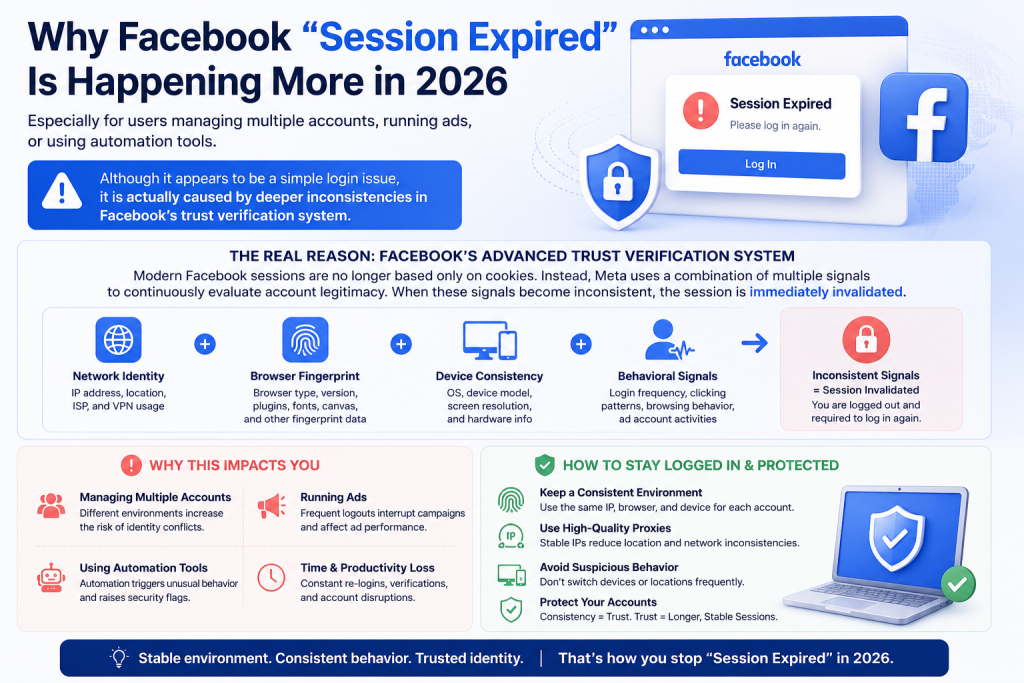
The Facebook “Session Expired” error has become more frequent in 2026, especially for users managing multiple accounts, running ads, or using automation tools. Although it appears to be a simple login issue, it is actually caused by deeper inconsistencies in Facebook’s trust verification system.
Modern Facebook sessions are no longer based only on cookies. Instead, Meta uses a combination of network identity, browser fingerprint, device consistency, and behavioral signals to continuously evaluate account legitimacy. When these signals become inconsistent, the session is immediately invalidated.
What Does “Session Expired” Actually Mean?
At a technical level, Facebook sessions are authentication states linked to several trust signals simultaneously.
In the past, Facebook mainly relied on cookies and tokens. If your login cookie remained valid, your session stayed active. In 2026, the system is significantly more advanced.
A Facebook session is now tied to:
| Verification Layer | Purpose |
|---|---|
| Login Cookies | User authentication |
| IP Address Reputation | Detect suspicious networks |
| Browser Fingerprint | Device consistency validation |
| Behavioral Patterns | Human vs automation analysis |
| Geolocation Consistency | Regional trust verification |
| Session Token Integrity | Anti-hijacking protection |
If one or multiple layers suddenly change, Facebook may terminate the session automatically.
For example:
- Logging in from different countries within hours
- Switching between datacenter proxies rapidly
- Using low-trust VPN IPs
- Running multiple accounts in one browser profile
- Frequent cookie injection or browser resets
- Automated scraping or suspicious clicking behavior
All of these can trigger session expiration events.
Why Facebook Session Expired Errors Became More Common in 2026
The biggest reason is Meta’s aggressive anti-abuse infrastructure upgrades.
Facebook is no longer simply protecting against hacked accounts. The platform is now actively fighting:
- Automation systems
- Fake engagement farms
- Ad fraud networks
- Multi-account abuse
- AI-generated bot activity
- Scraping systems
- Unauthorized data collection
As a result, Facebook heavily analyzes network identity quality.
This is where most users unknowingly fail.
Many people attempt to manage Facebook accounts using:
- Free VPNs
- Shared datacenter proxies
- Public SOCKS5 IPs
- Browser cookie sharing
- Cheap mobile emulators
These environments create highly abnormal trust patterns.
Once Facebook detects low-quality IP reputation or unstable browser identity signals, session invalidation becomes extremely likely.
The Hidden Role of IP Reputation in Facebook Session Stability
One of the most overlooked causes of session expiration is IP reputation.
Facebook internally scores IP addresses based on historical behavior. If an IP has been associated with spam, scraping, automation, fake accounts, or mass login attempts, it gains a poor trust score.
Datacenter proxies are especially vulnerable because many users share the same subnet infrastructure.
This is why users often encounter:
- Repeated login verification
- Suspicious activity alerts
- Instant logout after login
- Two-factor authentication loops
- “Session Expired” popups
Residential proxies behave differently because they originate from real ISP-assigned household networks.
To Facebook, residential traffic looks much closer to organic human activity.
This is why many professional marketers, media buyers, and social automation teams now rely on rotating residential proxies and static ISP proxies instead of traditional VPN services.
Common Scenarios That Trigger Session Expiration
The “Session Expired” issue rarely happens randomly. Most cases fall into predictable patterns.
One major trigger is browser fingerprint inconsistency.
If your browser suddenly changes:
- Canvas fingerprint
- WebGL rendering
- Screen resolution
- Timezone
- Language settings
- Device identifiers
Facebook may treat the session as hijacked.
Another major trigger is aggressive IP rotation.
For example:
import requests

proxy = {
    "http": "http://username:password@gateway.colaproxy.com:port",
    "https": "http://username:password@gateway.colaproxy.com:port"
}

response = requests.get(
    "https://www.facebook.com/",
    proxies=proxy,
    timeout=30
)

print(response.status_code)
If this IP rotates every request while using the same Facebook account, Meta may detect impossible location changes.
Stable session management requires balancing:
- Browser consistency
- IP consistency
- Human-like activity patterns
Facebook Session Fix Strategy Matrix
To better understand how Facebook session issues connect to infrastructure-level problems, the following matrix breaks down the most common failure patterns and their technical causes. This is especially useful for marketers, automation teams, and multi-account operators who need stable Facebook environments.
| Problem | Cause | Recommended Fix |
|---|---|---|
| Session expired loop after login | Frequent IP switching or unstable network identity | Use sticky residential proxy to maintain consistent IP session |
| Repeated login verification or checkpoint requests | Low IP reputation or datacenter proxy usage | Switch to high-quality ISP residential proxy with clean reputation |
| Logout immediately after login | Browser fingerprint mismatch or environment reset | Use browser isolation (anti-detect browser) with stable fingerprint |
| Facebook detects unusual activity | Mixed device signals or inconsistent timezone/location | Align timezone, language, and device fingerprint with proxy location |
| Ads account instability | Shared IP usage or multi-account overlap | Assign dedicated residential IP per account environment |
This matrix highlights an important principle: Facebook session stability is not a single-factor problem, but a combination of network, browser, and behavioral consistency.
How to Fix Facebook Session Expired Error Permanently
The “Session Expired” issue is usually not a simple login error. It often comes from unstable or conflicting trust signals in the account environment, which is why basic fixes only work temporarily.
To fix it properly, start by removing all corrupted authentication data, including Facebook cookies, cached storage, IndexedDB data, and old session tokens. These leftovers often continue to trigger repeated logouts even after re-login.
Next, rebuild a consistent environment. Facebook relies heavily on behavioral and device consistency, so using one browser profile, one stable IP, and one unchanged device identity is critical. Frequent switching between networks or devices is one of the main reasons sessions keep expiring.
For multi-account operations, the biggest risk is shared browser identity. When accounts run under the same fingerprint or environment, they can become linked and lose stability. This is where isolation becomes essential.
Anti-detect browsers solve this by separating fingerprints, cookies, and session storage for each account. Combined with stable residential IPs, this creates a clean and independent environment that significantly reduces session expiration issues.
In most cases, long-term stability does not come from repeated fixes, but from maintaining consistent identity signals across every login session.ination.
Why Static Residential Proxies Work Better for Facebook Accounts
Rotating proxies are excellent for web scraping and automation.
Facebook session management is different.
Long-lived sessions require:
- Stable geolocation
- Consistent ISP identity
- Persistent IP reputation
Static residential proxies provide this stability because the IP remains unchanged over long periods.
This makes them ideal for:
- Facebook Business Manager
- Ad account operation
- Marketplace accounts
- Creator accounts
- Agency workflows
Instead of appearing as dozens of random users, your traffic appears as one stable household connection.
Why Free Proxies Fail on Facebook
Free proxies are one of the most unreliable options for Facebook usage because they are heavily overused and lack any form of trust stability. Most of these IPs have already been exposed to large-scale abuse, including spam, automation, and fake account activity, which makes them easily identifiable within Meta’s risk detection systems.
As a result, Facebook often treats traffic coming from these networks as high-risk. Instead of providing stable access, free proxies frequently trigger security mechanisms such as repeated login verification, temporary account locks, unexpected session expiration, and continuous device authentication loops.
In many cases, the instability is not random but directly tied to the poor reputation history of the IP range itself. Once an IP has been repeatedly flagged or shared across thousands of unknown users, its trust value drops significantly, making consistent Facebook sessions almost impossible to maintain.
This is why more stable infrastructure, such as residential proxy networks with cleaner and more consistent IP reputation, is generally preferred when account stability and long-term access are required.
Using ColaProxy for Facebook Session Stability
ColaProxy has become increasingly popular among automation teams and account managers because of its large residential IP pool and flexible session control.
Key advantages include:
- Rotating residential proxies
- Static ISP proxies
- Sticky session support
- City-level targeting
- SOCKS5 compatibility
- High concurrent connections
For Facebook-related workflows, sticky residential sessions are especially useful because they maintain stable IP identity while reducing abrupt trust changes.
This improves:
- Session persistence
- Login success rates
- Account stability
- Business Manager reliability
Can Facebook Session Expired Errors Be Completely Eliminated?
Not entirely.
Facebook continuously changes its risk models.
However, high-quality infrastructure can drastically reduce problems.
The biggest difference between stable and unstable setups usually comes down to:
- IP quality
- Fingerprint consistency
- Behavioral realism
- Session persistence
Most account bans and session invalidations happen because environments look artificial.
The closer your setup resembles a real household user, the safer your sessions become.
Final Thoughts
The Facebook “Session Expired” error in 2026 is no longer a simple technical glitch. It is a trust-based system response driven by multiple layers of identity verification.
Fixing it permanently requires more than clearing cookies. It requires maintaining consistency across network identity, browser environment, and behavioral patterns.
In modern Facebook operations, stability is no longer achieved through quick fixes, but through structured and consistent digital environments.