
The Verdict: Why You Can’t Win Without Rotation
If you are aiming to cop the latest hype on Footlocker in 2026, you are no longer fighting other humans; you are fighting DataDome’s advanced AI. The reality is simple: Footlocker botting is now a game of digital camouflage. Without a sophisticated proxy rotation strategy, your bot—no matter how fast it is—will be flagged and ghost-banned before the “Add to Cart” button even turns blue.
The Bottom Line: Success requires a multi-layered network approach. By utilizing ColaProxy’s diverse pool of rotating residential proxies and mobile proxies, you mimic genuine human behavior across thousands of unique IP addresses, making it statistically impossible for Footlocker to pin you down.
What is Footlocker Botting in the Era of Advanced Detection?
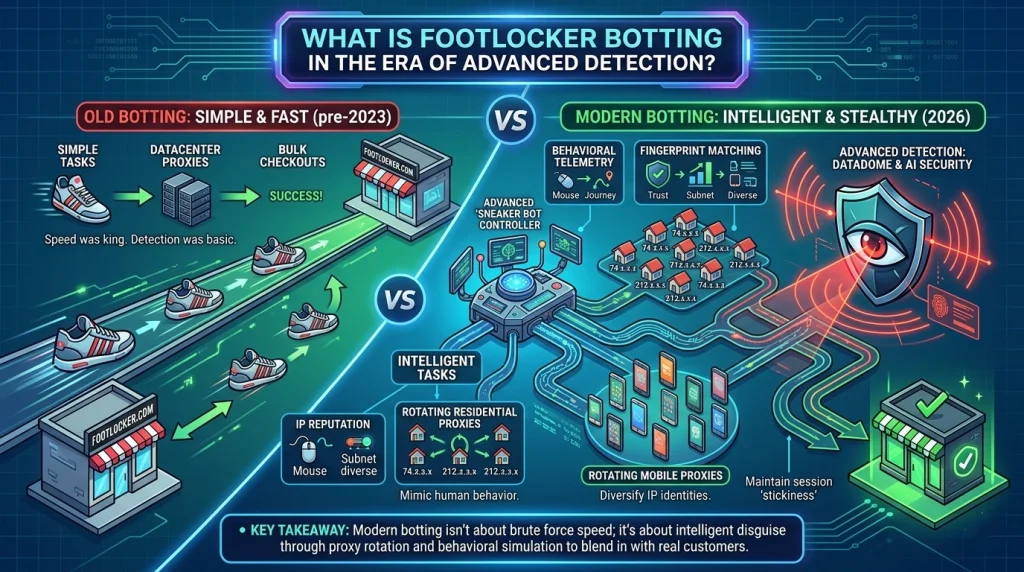
In its simplest form, Footlocker botting is the use of automated software to complete the checkout process faster than any human could. However, in 2026, “fast” isn’t enough. Footlocker has integrated behavioral telemetry that analyzes mouse movements, browser fingerprints, and—most critically—IP reputation.
When you run 100 tasks on a single static IP, you are shouting your identity to their security servers. Proxy rotation is the mechanism that switches your IP address for every request or session, allowing you to appear as 100 different shoppers from 100 different households.
Why Static IPs are a Death Sentence for Sneaker Drops
Many beginners make the mistake of buying cheap, static datacenter proxies. While these are fast, they are “loud.”
- Subnet Bans: Datacenter IPs often come in sequential blocks. If Footlocker detects one bot on an IP, they might ban the entire range (e.g., 192.168.1.1 through 192.168.1.255).
- Low Trust Scores: Security providers like DataDome maintain massive databases of datacenter providers. They know these IPs don’t belong to real homes.
- Lack of Diversity: Static IPs cannot “evolve” during a drop. If you get a 403 Forbidden error, that task is dead for the rest of the release.
How Proxy Rotation Bypasses Modern Security
Rotation solves the “fingerprinting” problem by ensuring that no single IP address performs enough actions to trigger an automated block. Here is how different types of rotation work within the ColaProxy ecosystem:
1. Rotating Residential Proxies
These are the gold standard for Footlocker botting. These IPs are assigned by Internet Service Providers (ISPs) to actual homeowners. When you use rotating residential proxies, your bot’s traffic is indistinguishable from a mom in Ohio or a student in London browsing for shoes.
- Takeaway: Use these for your main tasks to ensure the highest bypass rate.
2. Rotating Mobile Proxies
Mobile IPs (4G/5G/6G) carry the highest authority. Because mobile carriers use CGNAT (Carrier Grade NAT), hundreds of real people often share a single IP. If Footlocker blocks a mobile IP, they risk blocking thousands of legitimate customers.
- Pro Tip: Save your rotating mobile proxies for the highest-heat drops, such as Yeezy or limited Jordan 1s.
3. Static ISP Proxies (The Hybrid)
Sometimes you need the speed of a datacenter with the trust of a residential IP. Static ISP proxies offer “sticky” sessions that are perfect for maintaining a login state on Footlocker accounts without the risk of a sudden IP change mid-checkout.
Comparison: Choosing Your Weapon
| Proxy Type | Speed | Trust Level | Best Use Case |
| Rotating Residential | Medium | Very High | High-volume tasking & bypass |
| Rotating Mobile | Medium | Extreme | Ultra-limited “Hype” releases |
| Static ISP | Ultra-Fast | High | Account logins & fast checkouts |
| Rotating Datacenter | Instant | Low | Monitoring & scrapers |
Step-by-Step: The Professional Footlocker Setup
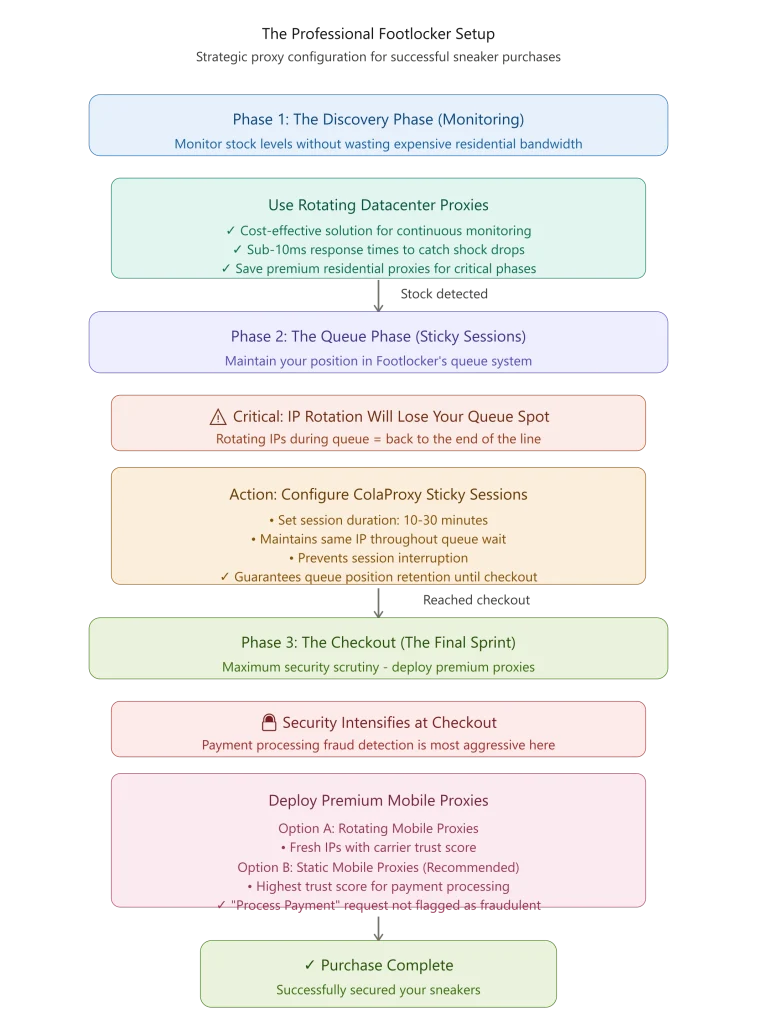
To succeed in Footlocker botting, follow this methodology verified by our top-tier clients at ColaProxy.
Phase 1: The Discovery Phase (Monitoring)
Don’t waste your expensive residential data just watching the site. Use rotating datacenter proxies to monitor stock levels. They are cost-effective and provide the sub-10ms response times needed to catch a shock drop.
Phase 2: The Queue Phase (Sticky Sessions)
Footlocker often employs a queue system. This is where rotation gets tricky. If your IP rotates while you are in the queue, you will lose your spot.
- Action: Configure your ColaProxy dashboard to use Sticky Sessions (10–30 minutes). This ensures you keep the same IP through the queue and until the checkout is complete.
Phase 3: The Checkout (The Final Sprint)
Once you hit the checkout page, the security intensifies. This is where rotating mobile proxies or high-quality static mobile proxies shine. Their high trust score ensures the “Process Payment” request isn’t flagged as fraudulent.
The ColaProxy Advantage: Why Quality Matters
Not all “rotating” services are equal. Many providers oversell their pools, leading to “dirty” IPs that are already banned. ColaProxy maintains a clean, ethically sourced pool specifically optimized for sneaker sites.
- Global Coverage: Access IPs in the US, UK, EU, and Asia to match Footlocker’s regional domains.
- High Concurrency: Run thousands of tasks simultaneously without bottlenecking.
- Protocol Support: We support HTTP, HTTPS, and SOCKS5 to ensure compatibility with every major bot on the market.
Case Study: Overcoming the “Access Denied” Loop
A client recently approached us after failing three consecutive drops. They were using a “premium” competitor but kept hitting the dreaded “Access Denied” screen.
The Solution:
We analyzed their logs and found they were using rotating proxies with a 1-minute timer. Footlocker’s security was flagging the rapid IP changes during the session. We moved them to ColaProxy’s static ISP proxies for their “Elite” accounts and rotating residential proxies with 15-minute sticky sessions for their “Guest” tasks.
The Result: On the next Jordan 4 release, they successfully checked out 14 pairs. The consistency of the IP during the sensitive checkout phase was the “non-negotiable” factor they were missing.
FAQ: Mastering Footlocker Botting & Proxies
How many proxies do I need for Footlocker?
A general rule of thumb is a 1:1 or 2:1 ratio (proxies to tasks). If you are running 100 tasks, you should have at least 100-200 rotating IPs available in your pool to avoid rate-limiting.
What is the best proxy for footlocker bots?
For most users, rotating residential proxies offer the best balance of cost and success. However, if you are botting high-security regions like Footlocker US, adding rotating mobile proxies into your mix is highly recommended.
Will rotating my IP slow down my checkout?
If you use a high-quality provider like ColaProxy, the latency is negligible (usually under 100ms). The security bypass you gain far outweighs the few milliseconds of network travel time.
Essential Pre-Drop Checklist
Before the timer hits zero, ensure your setup is bulletproof:
- Test your proxies: Use a proxy checker to ensure your IPs aren’t on a blacklist.
- Sync your clocks: Ensure your bot’s server time is perfectly synced with the Footlocker release time.
- Check Data Balance: Ensure your residential plan has enough GBs to last the duration of the drop.
- Configure Rotation: Set sticky sessions to at least 10 minutes to survive the queue.
- Diversify: Use a mix of static mobile proxies and residential IPs.
Final Takeaway: Strategy Over Speed
In the world of Footlocker botting, the winner isn’t the person with the fastest server—it’s the person with the most human-like network presence. Proxy rotation is no longer a “luxury” feature; it is the foundation of every successful setup.
By diversifying your IP types and leveraging the high-trust pools at ColaProxy, you can stop worrying about “Bot Detected” screens and start focusing on your growing sneaker collection.
Reference Materials:
- For industry standards on web scraping and bot detection, refer to the IETF RFC 7230 regarding HTTP/1.1 messaging.
- Consult the OWASP Automated Threats to Web Applications for a professional deep-dive into how retailers identify bot traffic.