Summary:
Successfully scaling to 100+ Nike SNKRS accounts in 2026 requires more than just a bot; it demands a robust identity isolation strategy. By pairing Residential IPs with anti-detect browsers and unique hardware fingerprints, you can bypass Akamai’s sophisticated detection.
This guide provides a verified methodology using ColaProxy’s elite infrastructure to ensure your accounts survive the “filter” and land more “Got ’Em” screens.
The 2026 Sneaker Game: Why Identity Isolation is Everything
If you have ever faced the dreaded “407 Proxy Authentication Required” on Another Nike Bot or seen your entire account list “clipped” during a high-heat Dunk or Jordan drop, you know that Nike’s security is world-class. In the current landscape, Nike doesn’t just look for bad emails; they analyze your TCP/IP stack, WebRTC leaks, and browser cadence.
To succeed, you must move away from “bulk” thinking and toward “individual” thinking. The foundation of this strategy is the use of high-quality Residential IPs. Unlike datacenter ranges, which are easily flagged as “server-side,” residential IPs originate from genuine home internet connections, making your automated traffic indistinguishable from a real shopper in a suburban living room.
What are the Best Residential IPs for Nike Accounts?
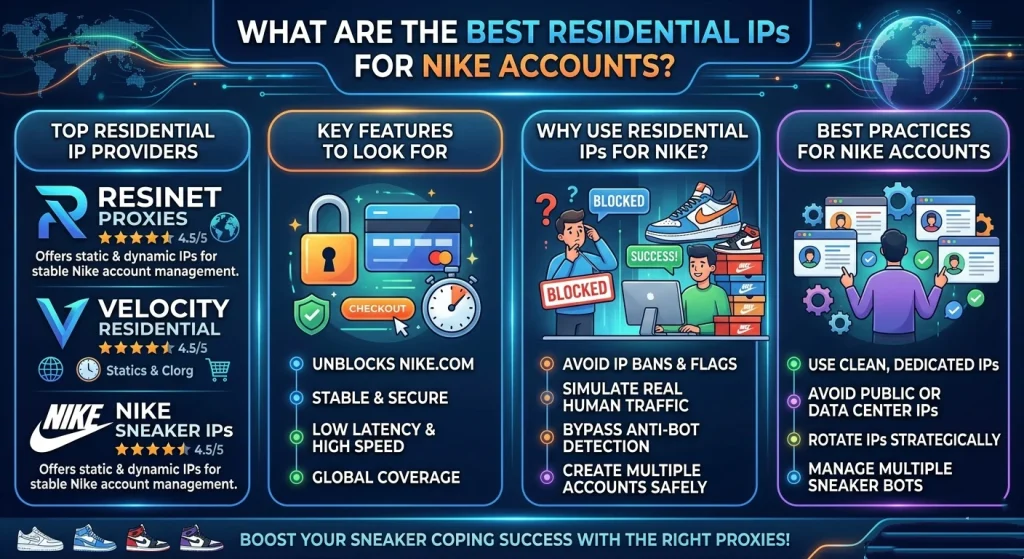
When users ask, “Do Google datacenter proxies work for Nike?” or “Does AWS proxy work for Nike SNKRS?”, the answer is a resounding no. Nike’s anti-bot system, powered by Akamai, keeps an updated “blackhole” list of all major cloud provider IP ranges.
To create 100+ accounts safely, you need a mix of proxy types that offer high trust scores:
- Rotating Residential Proxies: These pull from a massive pool of millions of IPs. They are excellent for the initial “warming” phase and for entering draws where you need fresh IPs for every entry.
- Static ISP Proxies (Static Residential): These are the “Gold Standard” for account creation. They provide the speed of a datacenter with the residential status of an ISP. Because the IP stays the same, Nike is less likely to flag the account for “suspicious login activity.”
- Rotating Mobile Proxies: These use 4G/5G cellular towers. They are nearly impossible for Nike to ban because thousands of real users share the same IP. Use these for your most valuable accounts or for final SMS verification.
Proxy Comparison Table for Nike Botting
| Proxy Type | Trust Level | Best For | Stability |
| Static ISP | Ultra-High | Account Creation / Login | 10/10 |
| Rotating Residential | High | Entry Submission / Scraping | 8/10 |
| Mobile (4G/5G) | Elite | Verifying Accounts | 9/10 |
| Datacenter | Low | Monitoring / Speed Tests | 3/10 |
How to Create 100+ Nike Accounts Safely (Step-by-Step)
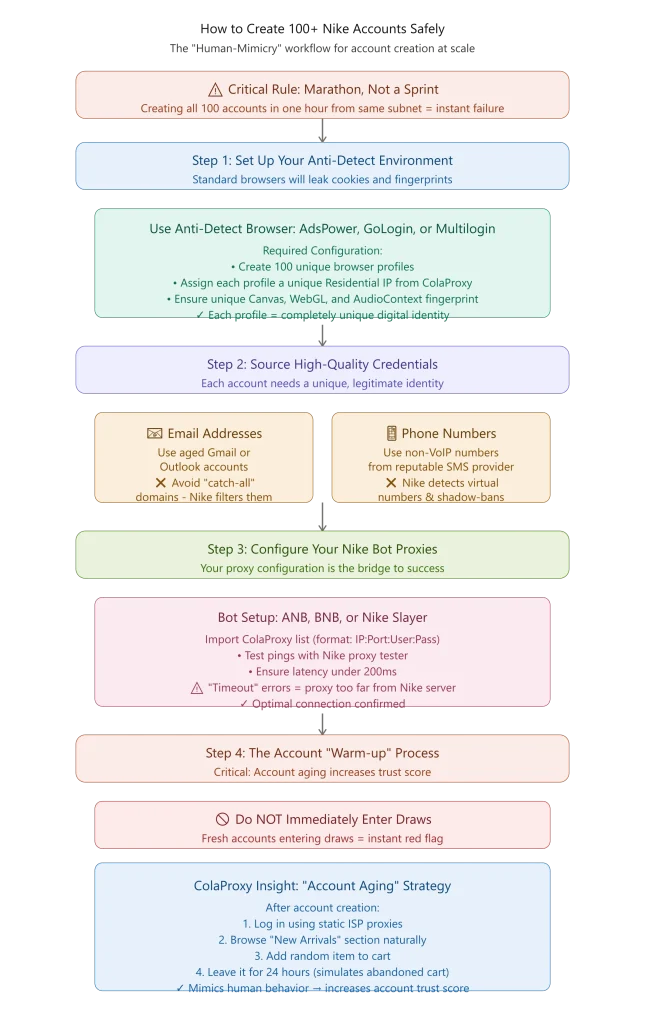
Creating 100 accounts is a marathon, not a sprint. If you try to register all of them in one hour from the same subnet, you will fail. Follow this “Human-Mimicry” workflow.
Step 1: Set Up Your Anti-Detect Environment
You cannot use a standard Chrome or Safari window for 100 accounts. Cookies and browser fingerprints will leak. Use an anti-detect browser like AdsPower, GoLogin, or OKBrowser.
- Create 100 unique profiles.
- Assign each profile a unique Residential IP from ColaProxy.
- Ensure each profile has a unique Canvas, WebGL, and AudioContext fingerprint.
Step 2: Source High-Quality Credentials
Each account needs a unique identity.
- Emails: Use aged Gmail or Outlook accounts. Avoid “catch-all” domains as Nike often filters them.
- Phone Numbers: Use a reputable SMS provider that offers non-VoIP numbers. Nike’s system can detect virtual numbers (Google Voice, etc.) and will shadow-ban those accounts.
Step 3: Configure Your Nike Bot Proxies
Whether you are using Another Nike Bot (ANB), Better Nike Bot (BNB), or Nike Slayer, your proxy configuration is the bridge to success.
- How to put proxies on Nike accounts: Import your ColaProxy list (format: IP:Port:User:Pass).
- Test your pings: Use a Nike proxy tester to ensure your latency is under 200ms. If you see “Timeout” errors in Nike Slayer, your proxy location might be too far from the Nike server.
Step 4: The Account “Warm-up” Process
One of the most unique insights we’ve gathered at ColaProxy is the importance of “Account Aging.”
- Action: After creating an account, do not immediately enter a draw.
- Strategy: Log in using your static ISP proxies, browse the “New Arrivals” section, and add a random item to the cart. Leave it there for 24 hours. This simulates “abandoned cart” behavior, which is a common human trait that increases the account’s trust score.
Avoiding Common Technical Pitfalls
Even with the best proxies for Nike, small technical leaks can ruin your setup.
Solving the “407 Proxy Authentication Required” Error
This error often occurs in Another Nike Bot when your IP address hasn’t been whitelisted in your proxy provider’s dashboard. Ensure that if you are using IP Authentication, your home/server IP is updated. If you use User/Pass auth, double-check for typos.
Preventing WebRTC Leaks
A WebRTC leak can reveal your true ISP IP address even if you are using Residential IPs. In your anti-detect browser settings, always set WebRTC to “Real” or “Disable” to ensure Nike only sees the proxy IP. Check your status at Whoer.net before starting your bot.
Mastering the Nike Proxy Scanner
Before a big drop, use a Nike proxy scanner to “check” your list. However, be careful—if you “check” too aggressively, you might get the IPs soft-banned before the drop even starts. We recommend checking only a small sample of your ColaProxy pool.
Why ColaProxy is the Professional’s Choice
At ColaProxy, we understand the sneaker industry isn’t just about “uptime”—it’s about “undetectability.” Our infrastructure is designed to handle the specific requirements of the Nike SNKRS app.
- Global Coverage: Access Nike EU proxies, Nike UK proxies, and Nike CA proxies to hit drops across different time zones.
- Clean IP Pool: We constantly rotate out flagged IPs to ensure our residential proxies have the highest success rates.
- Seamless Integration: Our IPs work perfectly with all major bots, including Another Nike Bot smart proxy configurations.
Read more on our blog to sharpen your strategy:
- The Ultimate Guide to Setting Up a Sneaker Bot with Residential Rotation
- Why Static IPs Get Banned on Retail Sites (and How Rotation Saves You)
- How to Scrape Retail Prices Without Triggering “Bot Detected” Screens?
- Bypassing Akamai: Why Rotating Residential Proxies are Stealthier
- How to Cop Multiple Pairs of Yeezys Without Getting Your IP Banned
Summary Checklist for 100+ Nike Accounts
Use this checklist to ensure your infrastructure is ready for the next “Live” draw.
- 1:1 Ratio: One unique Static ISP Proxy per Nike account.
- Anti-Detect Profiles: 100 distinct browser environments created.
- No Overlap: Different payment methods (jigged addresses and virtual cards).
- Warm-up Period: Accounts have at least 48 hours of browsing history.
- Proxy Health Check: All IPs verified via a Nike proxy tester.
FAQ: Expert Answers on Nike Account Creation
What is a Nike proxy statement?
In a technical context, users often confuse “proxy statement” (a legal/financial term) with a “proxy configuration.” For sneaker botting, your “proxy statement” is essentially your proxy list—the set of Residential IPs your bot uses to communicate with Nike’s servers.
How to test proxy ping on Better Nike Bot?
In the Better Nike Bot interface, navigate to the “Proxies” tab. Paste your ColaProxy credentials and click “Test.” A good ping for Nike is typically under 150ms. If it is higher, consider switching to a proxy server located closer to Nike’s data centers (typically US-East or US-West).
Does creating proxies get you banned?
If you try to “create” your own proxies by renting a cheap VPS and installing a proxy script, you will be banned. Nike identifies these server-side IPs instantly. The only way to “create” a safe setup is by using a provider that offers genuine Residential IPs.
How to make Nike residential proxy sessions “Sticky”?
When using ColaProxy, you can choose “Sticky Sessions” in your dashboard. This ensures that your account stays on the same IP address for up to 30 minutes, preventing a logout or “security challenge” during the checkout process.
Conclusion: The Competitive Edge
Creating 100+ Nike accounts is a significant investment in time and resources, but with the right Residential IPs, it becomes a scalable business model. By focusing on quality over quantity and maintaining strict identity isolation, you move from being a “botter” to a professional reseller.
Are you ready to scale your sneaker game? Get started with ColaProxy today and experience the power of elite Residential IPs.
Takeaway: The key to 100+ accounts isn’t speed—it’s stability. Use Static ISP proxies for account health and Rotating Residential proxies for draw volume. Never skip the warm-up phase, and always verify your fingerprints.