Summary:
Extracting data from LinkedIn in 2026 is a game of cat and mouse. To scrape LinkedIn without the commercial use limit, you must transition from “bot-like” behavior to “human-emulated” systems. The secret lies in a dual-layer approach: using rotating residential proxies for high-volume data harvesting and static ISP proxies for stable account management.
By leveraging Google X-Ray searches and smart throttling, you can bypass LinkedIn’s $1,000/month paywalls and keep your accounts safe from permanent bans.
Why is it impossible to scrape LinkedIn?
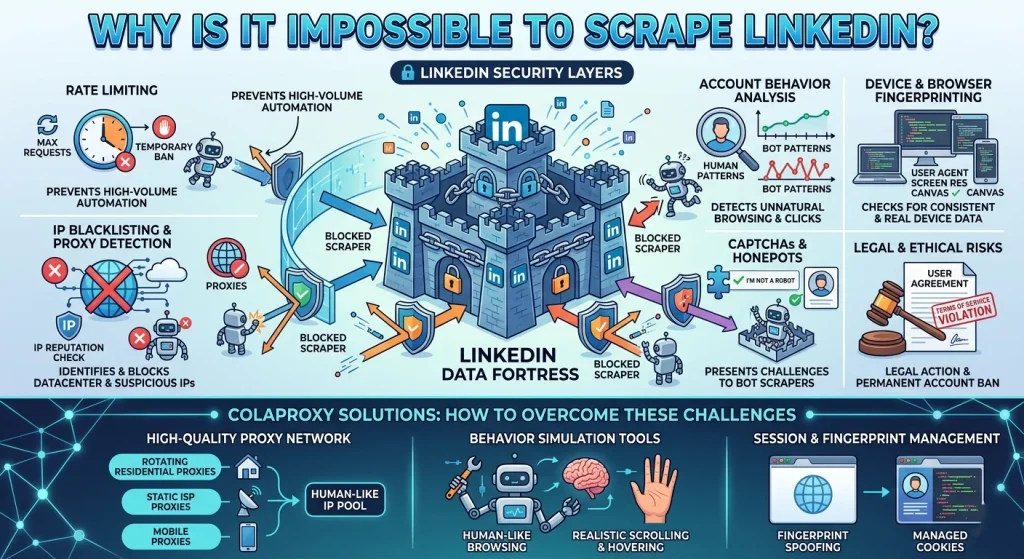
If you’ve tried to build a simple Python script to crawl profiles, you’ve likely hit a wall within minutes. Many users ask, “Why is it impossible to scrape LinkedIn?” It isn’t impossible, but LinkedIn’s defense mechanism is world-class.
LinkedIn employs behavioral biometrics and network fingerprinting. They don’t just look at what you are doing; they look at how you are doing it. If your mouse movements are too linear, your request headers are missing specific cookies, or your IP address originates from a known datacenter, you are flagged.
Does LinkedIn allow for web scraping?
Technically, no. Their User Agreement strictly prohibits automated data collection. However, the legal landscape (notably the hiQ Labs v. LinkedIn case) has historically differentiated between public and private data. For businesses, the goal is to scrape data from LinkedIn while remaining under the radar of Linkedin automation detection.
The Roadblock: Anyone else hitting the LinkedIn “Commercial Use Limit?”
The “Commercial Use Limit” is a soft cap placed on free accounts. When you perform a high volume of searches, LinkedIn assumes you are using the platform for professional prospecting and prompts you to upgrade to Sales Navigator.
How to lift LinkedIn’s search limit after reaching it:
- The Official Fix: Upgrade to a Premium or Sales Navigator account.
- The Patient Fix: Wait until the 1st of the next month when the limit resets.
- The Pro Fix: Use Scraping LinkedIn Without the Commercial Use Limit techniques like X-Ray searching.
Comparison: Free Account vs. Sales Navigator vs. Automated Scraping
| Feature | Free Account | Sales Navigator | Automated (ColaProxy Powered) |
| Search Limit | Low (variable) | ~2,500 results | Unlimited (via X-Ray/Proxies) |
| Profile Views | Limited | High | Unlimited (with Rotation) |
| Cost | $0 | ~$99+/mo | Variable (Pay-per-usage) |
| Detection Risk | Low | Low | Moderate (requires Pro Proxies) |
11 Pro Strategies: How to Bypass LinkedIn Search Limit in 2026
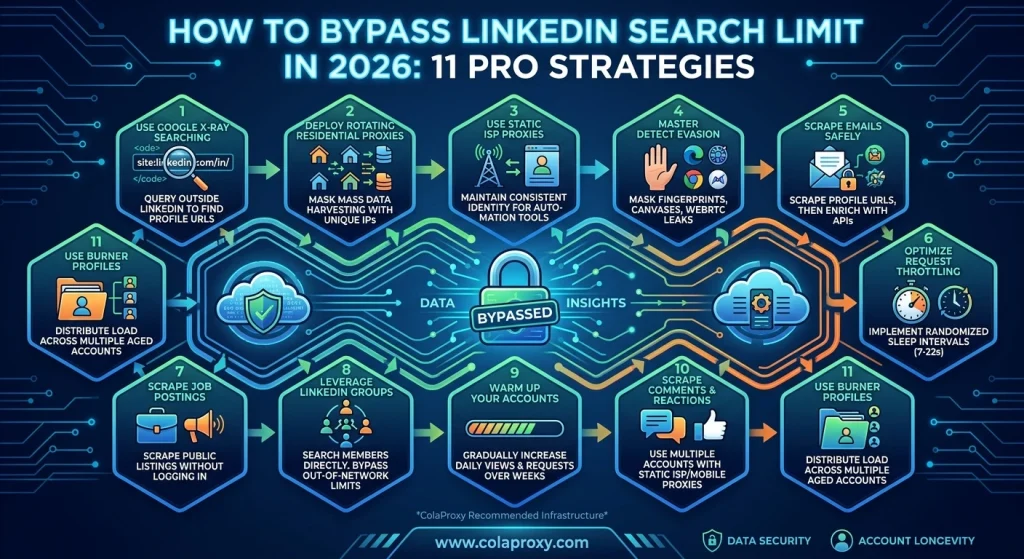
1. Utilize Google X-Ray Searching
The most effective way to scrape data from LinkedIn free of search limits is to stay off LinkedIn’s internal search engine.
- Method: Use the site:linkedin.com/in/ operator.
- Pro Tip: Combine this with rotating datacenter proxies to scrape Google search results without triggering “I’m not a robot” checks.
2. Deploy Rotating Residential Proxies for Mass Extraction
When you need to scrape linkedin profiles by the thousands, your home IP won’t cut it. Rotating residential proxies are essential. They route your requests through real household devices, making your scraper look like thousands of different people browsing from their homes. Learn more about our residential pool here.
3. Use Static ISP Proxies for Account Stability
If you are using automation tools (like Phantombuster or SalesRobot), you need a consistent identity. Static ISP proxies provide the reputation of a residential IP with the 99.9% uptime of a datacenter. This prevents the “suspicious login” alerts that lead to account bans.
4. Master LinkedIn Automation Detection Evasion
Will LinkedIn ban you for scraping? Yes, if your browser fingerprint is inconsistent. You must use anti-detect browsers (like AdsPower or OKbrowser) to mask your:
- Canvas Fingerprint
- WebRTC leaks
- AudioContext
5. How to Scrape Emails from LinkedIn Safely
Don’t try to scrape linkedin emails directly from the profile page; most users hide them. Instead:
- Scrape the Profile URL and Name.
- Use an enrichment API (like Hunter.io) to find the work email.
- This reduces the number of “clicks” your LinkedIn account makes, lowering your risk profile.
6. Optimize Your Request Throttling
Never scrape at “machine speed.”
- Takeaway: A human takes 5–10 seconds to read a profile. Your bot should do the same. Implement “Randomized Sleep” intervals between 7 and 22 seconds.
7. How to Scrape Job Postings from LinkedIn
Job postings are often public. You can scrape linkedin jobs without being logged in. Using a logged-out state combined with rotating mobile proxies is the safest way to gather market intelligence without risking your personal account.
8. Leveraging LinkedIn Groups
Members of the same group can view each other’s profiles more freely. Joining niche industry groups allows your scraper to access “2nd-degree” data as if it were “1st-degree” data.
9. Warm Up Your Accounts
If you buy a fresh LinkedIn account and immediately start scraping, you will be banned.
- Checklist:
- Week 1: 5–10 profile views/day.
- Week 2: 20 views + 5 connection requests.
- Week 3: Start light automation using static mobile proxies.
10. How Can You Scrape LinkedIn Comments?
Scraping engagement data (likes/comments) requires high-frequency monitoring. This is where rotating mobile proxies shine. Because thousands of people often share a single mobile IP (CGNAT), LinkedIn is very hesitant to block these IPs, even if they show high activity.
11. Use Multiple “Burner” Profiles
To scrape linkedin data at a massive scale, distribute the load across 10–20 accounts. Assign one Static ISP Proxy to each account to ensure they never “cross-contaminate” their footprints.
Deep Dive: The Proxy Infrastructure You Need
Choosing the wrong proxy is the #1 reason scrapers fail. Based on our internal data at ColaProxy, here is the success rate for various proxy types when attempting to scrape data from linkedin:
| Proxy Type | Success Rate | Best Use Case |
| Residential (Rotating) | 94% | Scraping 10k+ profiles daily |
| Mobile (Rotating) | 98% | High-security targets/Comments |
| Static ISP | 91% | Managing “Master” accounts |
| Datacenter | 15% | NOT RECOMMENDED for LinkedIn |
Expert Insight: “LinkedIn’s 2026 update now tracks the ‘velocity of navigation.’ If you move from a Profile Page to a Search Page in 0.1 seconds, you’re flagged. Use a proxy provider that offers low latency but high anonymity.” — ColaProxy Technical Lead.
FAQ: Common Questions About LinkedIn Scraping
How to scrape data from LinkedIn free?
You can use the “Google X-Ray” method mentioned above. By searching LinkedIn from the outside, you avoid the commercial limit entirely. However, you will still need a basic proxy to avoid Google’s CAPTCHAs.
Can I scrape data from LinkedIn using Python?
Yes, libraries like Selenium, Playwright, and BeautifulSoup are common. However, Selenium is easily detected. We recommend using Playwright with a stealth plugin and routing traffic through rotating residential proxies.
How to scrape LinkedIn profiles without an account?
Many LinkedIn profiles have a “public version.” By using a logged-out browser and rotating mobile proxies, you can extract basic name, title, and bio information without ever logging in.
How to avoid getting restricted on LinkedIn?
Keep your daily activity under “human” thresholds. For a standard account, that usually means under 80 profile views and 20 connection requests per day.
Conclusion: Scaling Your Growth in 2026
To scrape LinkedIn without the commercial use limit, you must stop thinking like a programmer and start thinking like a ghost. The platform’s security is designed to catch the “noisy” bots. By using ColaProxy’s elite network of rotating residential proxies and static ISP proxies, you provide your scraping tools with the digital camouflage they need to succeed.
Data is the new oil, but LinkedIn is the most guarded well in the world. Use the right tools, respect the limits where necessary, and always prioritize IP reputation.
Ready to start your extraction project?
Read more: