TikTok video upload failed? Or stuck at 99% with no error message?
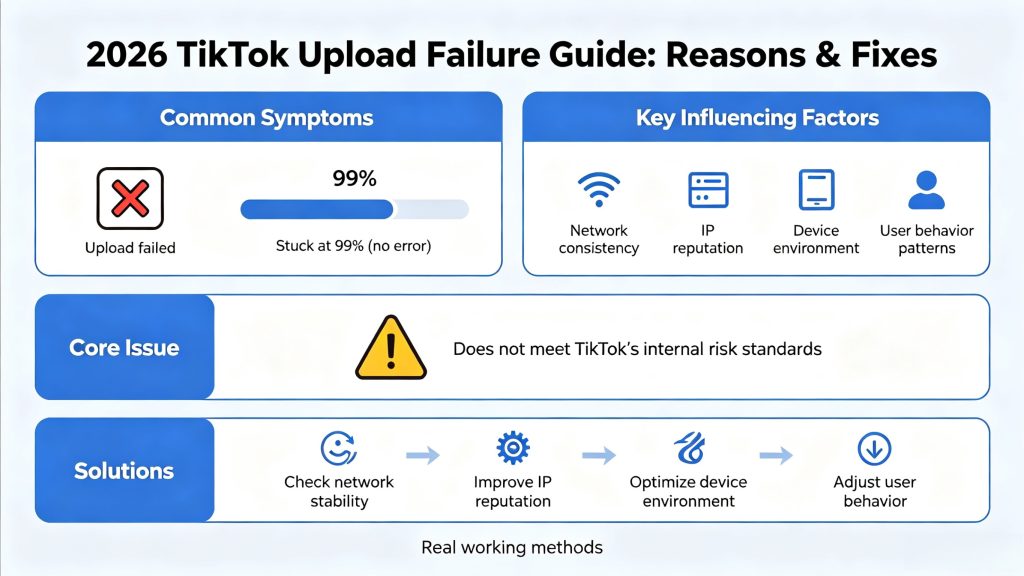
In 2026, TikTok operates as a highly automated content distribution system where upload stability may be influenced by factors such as network consistency, IP reputation, device environment, and user behavior patterns.
If your setup doesn’t meet TikTok’s internal risk standards, your video may never upload—no matter how fast your internet is.
This guide explains why TikTok uploads fail and how to fix them using real, working methods.
Quick Answer: Why TikTok Upload Fails
The most common factors associated with TikTok upload failures include:
- Unstable or interrupted internet connection
- Low-trust IP address (VPN or datacenter proxy)
- TikTok region mismatch
- Multiple accounts linked to the same environment
- Unsupported video format or encoding
- Device or browser inconsistency
Fixing these issues requires optimizing your network, IP, and environment—not just retrying uploads.
Why TikTok Videos Fail to Upload
A common mistake is assuming upload failures are caused only by slow internet. In reality, Upload success may depend on multiple technical and environmental signals analyzed during the request process.
These include IP reputation, connection stability, device consistency, account behavior, and geographic alignment. If any of these signals appear abnormal, the platform may interrupt the upload, freeze progress, or silently reject the request.
This is why users often see videos stuck at 30%, 60%, or 99%—even when their connection appears fast.
Understanding this mechanism is critical: TikTok upload failures are usually risk control decisions, not technical errors.
Unstable Internet and Low-Trust IP Addresses
Video uploads require continuous, high-quality data transfer. Even minor interruptions—such as packet loss or bandwidth fluctuation—can break the upload process.
However, network stability alone is not enough. TikTok also evaluates the trust level of your IP address.
Connections from the following environments are more likely to fail:
- Datacenter proxy networks
- Public or shared Wi-Fi
- IPs associated with automation or scraping
- Frequently rotating IP sessions
When these patterns are detected, uploads may fail, stall, or not complete due to risk or stability checks.
A more reliable solution is to use residential IP environments, where traffic resembles real users. In large-scale content operations, ISP-based residential proxy environments are often used to maintain more stable network conditions and reduce variability in connection quality—especially for content publishing and automation workflows.
TikTok Region Mismatch Issues
Geographic consistency between account activity and login environment may play a role in platform trust evaluation. The platform expects alignment between:
- Account registration region
- Current login location
- Content distribution target
If an account created in one country suddenly uploads from another region, it generates a mismatch signal. This often leads to upload interruptions, delayed processing, or reduced reach after publishing.
For cross-border teams and TikTok Shop sellers, this is a common issue. The most effective solution is to maintain region-aligned IP environments, ensuring that account activity appears consistent over time.
Multi-Account Upload Problems
Managing multiple TikTok accounts is standard practice in 2026, but it introduces significant risk when not handled properly.
Multiple accounts operating within the same environment may share detectable signals such as:
- IP address
- Device fingerprint
- Browser configuration
- Behavioral patterns
Uploading videos across multiple accounts from the same environment increases the likelihood of detection. In some cases, this may lead to reduced upload stability or additional verification checks.
To avoid this, each account should operate in an isolated environment with a dedicated IP, consistent device setup, and independent behavior patterns. When combined with residential proxy infrastructure, this approach allows each account to function as a separate, real user.
TikTok Upload Stuck or Not Processing
One of the most common issues is videos getting stuck during upload or processing.
This issue is commonly associated with:
- Network interruptions during file transfer
- Server-side processing delays
- Inconsistent session states
- Risk detection triggers mid-upload
Because video uploads are long-duration requests, they are especially sensitive to instability. Switching networks (e.g., Wi-Fi to mobile data) during upload is a frequent cause of failure.
To improve reliability, maintain a stable connection throughout the upload process and avoid any network changes.
Video Format and Encoding Errors
TikTok enforces strict requirements for video files. Even if a file appears normal, technical inconsistencies can cause upload failures or processing issues.
Common problems include:
- Unsupported codecs
- Corrupted file structures
- Excessive bitrate
- Non-standard compression formats
For best results, use:
- MP4 format
- H.264 encoding
- Standard resolution (e.g., 1080×1920)
- Balanced bitrate settings
Ensuring proper encoding significantly reduces the risk of upload errors.
Device and Environment Risks
TikTok upload performance may also be influenced by device-level consistency signals, browser fingerprint stability, and overall environment configuration in addition to network conditions.
Frequent changes such as switching between mobile devices, desktop browsers, and emulators can create inconsistencies. Low-quality emulators or rapidly changing browser fingerprints further increase risk.
For example, logging in from different device types within a short time frame may trigger suspicion and lead to upload issues.
Maintaining a consistent device environment helps build trust and improves long-term account stability.
How to Fix TikTok Upload Failed Issue (Step-by-Step)
Step 1: Stabilize network environment
- avoid switching networks
- ensure stable bandwidth
- no VPN reconnect during upload
Step 2: Use high-trust IP
- avoid datacenter IPs
- prefer residential ISP IPs
- ensure geo consistency
Step 3: Standardize device environment
- avoid frequent device switching
- use consistent browser/app setup
- reduce fingerprint changes
Step 4: Validate video format
- MP4 (H.264)
- standard resolution
- no corrupted encoding
Step 5: Separate multi-account setups
- isolate IP per account
- avoid shared environment overlap
Best Setup for Stable TikTok Uploads in 2026
As TikTok’s detection systems become more advanced, success increasingly depends on infrastructure quality.
A stable setup typically includes:
- Residential IP with high trust level
- Region-matched network environment
- Dedicated setup per account
- Consistent device fingerprint
- Human-like behavior patterns
This is why many professional teams rely on solutions like ColaProxy to provide stable, ISP-based residential IPs that support large-scale content operations.
Instead of treating upload failures as isolated problems, they should be viewed as signals that your current setup does not meet TikTok’s trust standards.
TikTok Upload Problems: Common Errors & Fixes
| Problem | Cause | Fix |
|---|---|---|
| TikTok upload failed | Low-trust IP | Use residential IP |
| TikTok not uploading | Network instability | Stabilize connection |
| Stuck at 99% | Session interruption | Re-upload with stable network |
| Processing forever | Risk detection | Fix IP + environment |
| Upload error | Format issue | Use MP4 (H.264) |
FAQ: TikTok Upload Problems
Why is my TikTok video stuck uploading?
Videos usually get stuck due to unstable connections, low-trust IP addresses, or risk detection triggers. Ensuring a stable network and using a reliable IP environment can resolve this issue.
How do I fix TikTok upload failure?
Fix upload failures by stabilizing your connection, using region-matched residential IPs, maintaining device consistency, and ensuring proper video formatting.
Does TikTok block VPN or proxy uploads?
TikTok may restrict uploads from low-trust proxies or datacenter IPs. Residential proxy environments are often considered more stable because they are closer to real residential ISP traffic patterns.
What format works best for TikTok videos?
MP4 with H.264 encoding is the most recommended format, along with standard resolution and bitrate settings.
Conclusion
TikTok upload failures in 2026 are often the result of multiple interacting technical and environmental factors rather than a single cause—they are the result of sophisticated systems designed to detect anomalies and enforce platform integrity.
Solving these issues requires a shift in approach. Instead of retrying uploads, users need to optimize their network, IP environment, device consistency, and behavior patterns.
When these factors are properly aligned, upload stability is generally improved.
For creators and teams operating at scale, building a stable and consistent technical setup has become increasingly important for maintaining reliable TikTok upload performance at scale.