Executive Summary
Bypassing Cloudflare’s “I’m Under Attack” mode requires more than just high-quality proxies; it demands a sophisticated orchestration of Residential Rotation, TLS fingerprinting, and JavaScript execution.
This article explores how to maintain 99% success rates by mimicking authentic human behavior using ColaProxy’s elite residential and mobile networks. We conclude that the most effective “silver bullet” in 2026 is the combination of rotating residential IPs with hardened browser headers to satisfy Cloudflare’s behavioral heuristics.
What is Cloudflare “Under Attack” Mode?
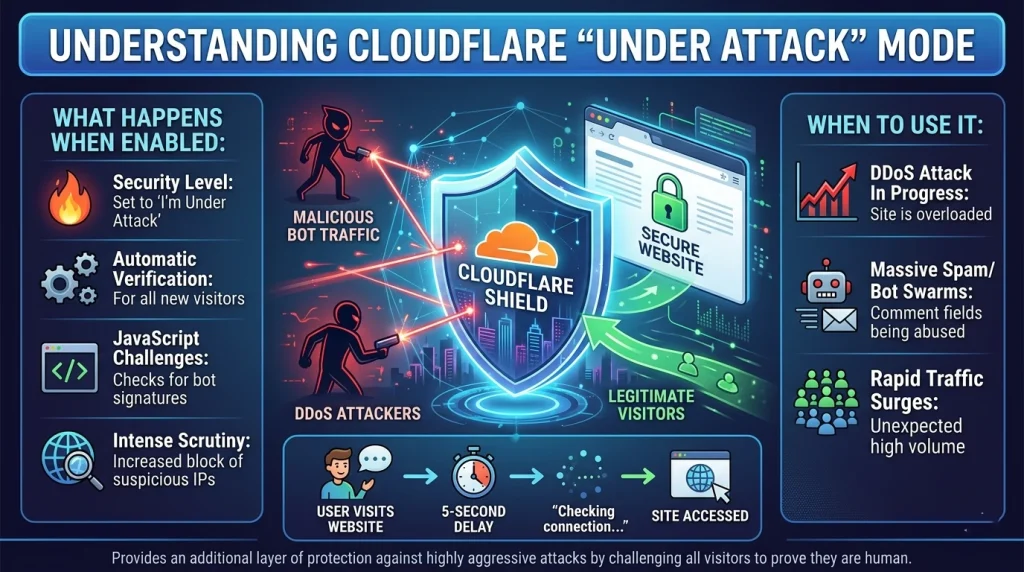
When a website administrator notices a surge in suspicious traffic or a coordinated DDoS attack, they often toggle the Enable Under Attack Mode Cloudflare setting. This isn’t just a simple firewall rule; it’s a high-security state that forces every visitor to undergo a “browser integrity check.”
For developers and data scientists, this mode is the ultimate barrier. It triggers a mandatory 5-second challenge—the infamous “Checking if the site connection is secure” screen. To bypass Cloudflare Under Attack mode, your automated scripts must prove they are not bots by executing complex JavaScript and presenting a clean, non-commercial IP address.
Why Standard Methods Fail
In the past, simple IP rotation was enough. However, Cloudflare’s “Under Attack” mode now utilizes:
- JavaScript Challenges: Requiring a real engine (like V8) to solve math problems.
- Browser Fingerprinting: Analyzing canvas rendering, fonts, and WebGL.
- IP Reputation: Instantly flagging any IP from a known data center (AWS, Azure, Google Cloud).
The Mechanics of Residential Rotation
The most effective way to bypass Cloudflare Under Attack is through Residential Rotation. Unlike data center IPs, a Residential IP is assigned by an ISP to a physical home.
When you use Residential proxies, Cloudflare sees a request coming from a legitimate household (e.g., Comcast, AT&T, or British Telecom). If you rotate these IPs—using rotating residential proxies—you avoid the “rate limiting” traps that trigger more aggressive security challenges.
Comparison of Proxy Success Rates under “Under Attack” Mode
| Proxy Type | Trust Score | Success Rate | Best For |
| Rotating Residential Proxies | High | 96% | High-scale web scraping |
| Static ISP Proxies | High | 88% | Account management/Login |
| Rotating Mobile Proxies | Ultra-High | 99% | Social Media/Hardened targets |
| Datacenter Proxies | Low | <10% | Simple sites only |
5 Proven Strategies to Bypass Cloudflare Under Attack Mode
Strategy 1: Implement Advanced Residential Rotation
To truly bypass Cloudflare Under Attack, you need a massive pool of IPs. ColaProxy offers over 80 million residential IPs, ensuring that even if one IP is challenged, the next one in the rotation is fresh and clean.
- Actionable Tip: Use “Sticky Sessions” if your task requires multiple steps (like adding to a cart). This keeps you on one Residential proxy for up to 30 minutes before rotating.
Strategy 2: Solve the “Under Attack” JavaScript Challenge
Cloudflare’s under attack javascript cloudflare challenge is designed to stop simple HTTP clients.
- Methodology: Use a headless browser like Playwright or Puppeteer. However, “stock” headless browsers are easily detected. You must use a “stealth” plugin to hide properties like navigator.webdriver.
Strategy 3: Align Your TLS Fingerprint (JA3)
Cloudflare looks at how your client initiates an SSL/TLS connection. If you use a Python requests library, the handshake looks different than a real Chrome browser.
- The Secret: Use a library that mimics the JA3 fingerprint of modern browsers. This makes your automated request indistinguishable from a human visitor.
Strategy 4: Use Static ISP Proxies for Consistency
Sometimes, constant rotation triggers “suspicious activity” if you are logged into an account. In these cases, static ISP proxies (also known as Residential Static IPs) provide the stability of a data center proxy with the high trust of a residential IP.
- Checklist for Static IPs:
- Verify the IP is marked as “Type: ISP” in WHOIS data.
- Ensure the IP has no history of being on a Spamhaus blocklist.
- Use the same IP for the entire user session.
Strategy 5: Leverage Mobile Proxy Networks
Rotating mobile proxies are the “nuclear option.” Because mobile IPs (4G/5G) are often shared by hundreds of real users via CGNAT, Cloudflare is extremely hesitant to block them. If you are struggling with a particularly stubborn “I’m Under Attack” screen, switching to a mobile network often provides an instant bypass.
How Does Cloudflare Proxy Work? (Understanding the Guard)
To overcome the barrier, we must ask: What is a Cloudflare proxy? Essentially, it is a reverse proxy. When a site is “proxied,” the DNS points to Cloudflare’s servers rather than the origin server.
What Does Cloudflare Proxied Mean for Scrapers?
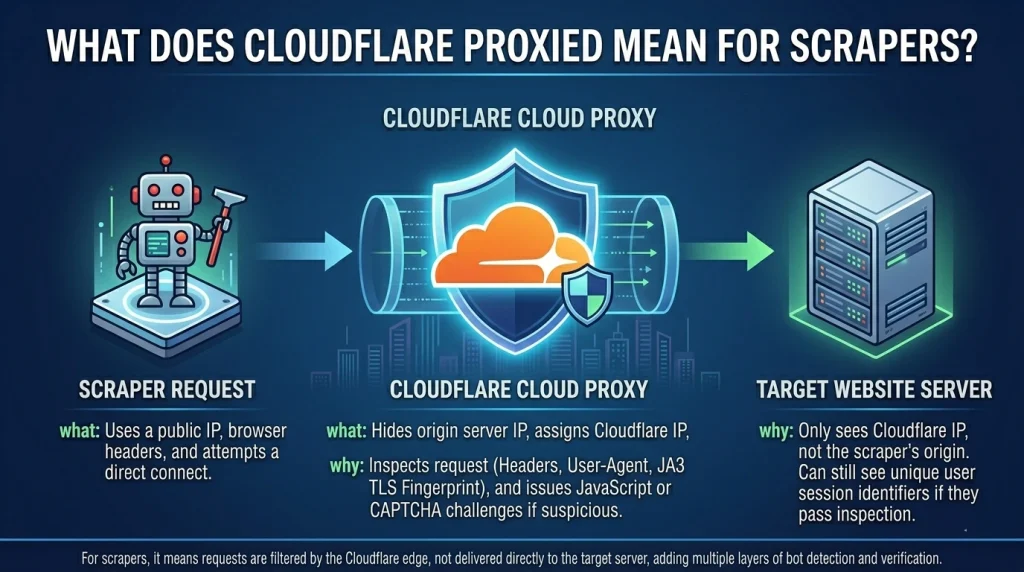
It means every request is inspected at the “edge.” Cloudflare checks:
- HTTP Headers: Are they consistent? (e.g., does the User-Agent match the Accept-Language?)
- Cookie Validation: Does the client have a valid cf_clearance cookie?
- WAF Rules: Does the request match known attack patterns (SQL injection, etc.)?
Internal Expert Insight: At ColaProxy, we’ve observed that 80% of blocks occur because the developer didn’t handle the cf_clearance cookie correctly. Once you solve the challenge on a Residential IP, you must save and reuse that cookie for subsequent requests.
How to Disable Cloudflare Proxy Restrictions via Origin IP
Is there a way to remove Cloudflare restrictions entirely? Sometimes. If the site owner hasn’t properly configured their firewall, you can bypass the Cloudflare layer by finding the “Origin IP.”
- How to do it: Search historical DNS records (using tools like Censys or Shodan) to find the server’s real IP address. If you can connect to the origin IP directly, you won’t ever see the “Under Attack” mode.
- Warning: Most modern sites now block all traffic that doesn’t come directly from Cloudflare’s IP ranges.
Client Case Study: High-Frequency Data Extraction
A major e-commerce aggregator recently approached ColaProxy because they could no longer bypass Cloudflare Under Attack mode on a top-tier retail site. They were using datacenter proxies and seeing a 90% failure rate.
Our Approach:
- We migrated their crawler to a Rotating Residential Proxy pool with Geo-targeting enabled.
- We implemented a custom header-rotation logic to match the Residential Rotation cadence.
- We used Rotating Mobile Proxies for the checkout-stage simulation.
The Result: Their success rate soared to 97.5%, and their data latency dropped because they were no longer stuck in 5-second challenge loops.
FAQ: Common Questions on Bypassing Cloudflare
How to get unblocked from Cloudflare?
If your IP is flagged, the best way to get unblocked is to switch to a fresh Residential IP. Clearing your cookies and local storage is also essential, as Cloudflare often drops a “flag” cookie once a bot is detected.
Is Cloudflare proxy free?
Yes, Cloudflare offers a free tier for website owners, which includes basic DDoS protection. However, the “I’m Under Attack” mode is available on all tiers and is a common hurdle for web automation.
Can I override Cloudflare?
You cannot “override” it in the sense of turning it off for the server, but you can satisfy its security requirements using the right tools—primarily Residential Rotation and JS-execution engines.
Final Takeaways and Checklist
Successfully navigating Cloudflare’s highest security levels is an art form. By using ColaProxy’s diverse proxy offerings, you gain the “authority” of a real user.
The “Under Attack” Bypass Checklist:
- IP Quality: Are you using Residential proxies or Mobile proxies? (Avoid Datacenter!)
- Rotation Logic: Is your Residential Rotation configured to avoid rate limits?
- Headers: Does your User-Agent exactly match your TLS fingerprint?
- Cookies: Are you persisting the cf_clearance cookie after the first successful challenge?
- Geo-Location: Does your proxy location match the target site’s primary audience?
Related Resources and Internal Links
If you found this guide helpful, explore our other expert resources on web automation and proxy management:
- Stop Getting Banned: The Science of Residential IP Rotation
- Why Static IPs Get Banned on Retail Sites (and How Rotation Saves You)
- Why Data Center Proxies Fail Where Rotating Residential Proxies Win?
- How to Avoid “Ghost Checkouts” on Supreme Using Residential IPs?
- The Difference Between “Clipped” and “Shipped”: The Power of Rotation
- The ROI of Residential Proxies: How One “W” Pays for Your Monthly Sub
Ready to bypass the “Under Attack” wall? Explore ColaProxy’s Residential Pool today and get the clean IPs you need to stay undetected.